
Write config.yaml
Tell Astranize which repos a task can change, which checks must pass, and how to run your app for each task.
Before an agent can work on your project, Astranize needs to know a few things about it: where your code lives, which checks prove a change is good, and, if you want the optional video, how to start your app so the result can be recorded. All of that lives in a single file per workspace, config.yaml, and every task in the workspace reads it.
You can edit it two ways. In the desktop app, Settings, Workspace shows it as forms, one tab per part, plus a YAML tab with the whole file. Or you open the file in your own editor. Both go through the same checks, and neither loses what the other wrote: a form changes only its own lines and keeps your comments and layout.
The example is a notes app with two repos, api and web. Each section shows the app first and the YAML it writes.
Where the file lives
Section titled “Where the file lives”Each workspace is a folder under ~/.astranize/workspaces/, and config.yaml sits at its top. Creating a workspace, with the New workspace wizard or workspace create, writes a first config.yaml for you. With no repos yet, it holds a single line:
repos: {}By the end of this guide the folder looks like this:
Directory~/.astranize/workspaces/notes/
- config.yaml
- workflow.yaml
Directoryflows/
- …
Directoryprompts/
- …
Directoryscripts/
- login.mjs
Directory.history/ earlier versions of config.yaml
- …
display_name is the name the workspace menu at the top left of the app shows, and every task you create there runs with the repos, checks and services you set here.
Start with one repo
Section titled “Start with one repo”The smallest useful config names one repo: where its main checkout is, and which branch new work starts from.
Open Settings, Workspace, on the Repos tab, and click Add repo. The New repo form asks for a Name, a Path (type it, or use Choose folder…) and a Base branch. The path is checked as you type, without running anything from the repo: “Git repository · branch main” when it is one. Click Add.
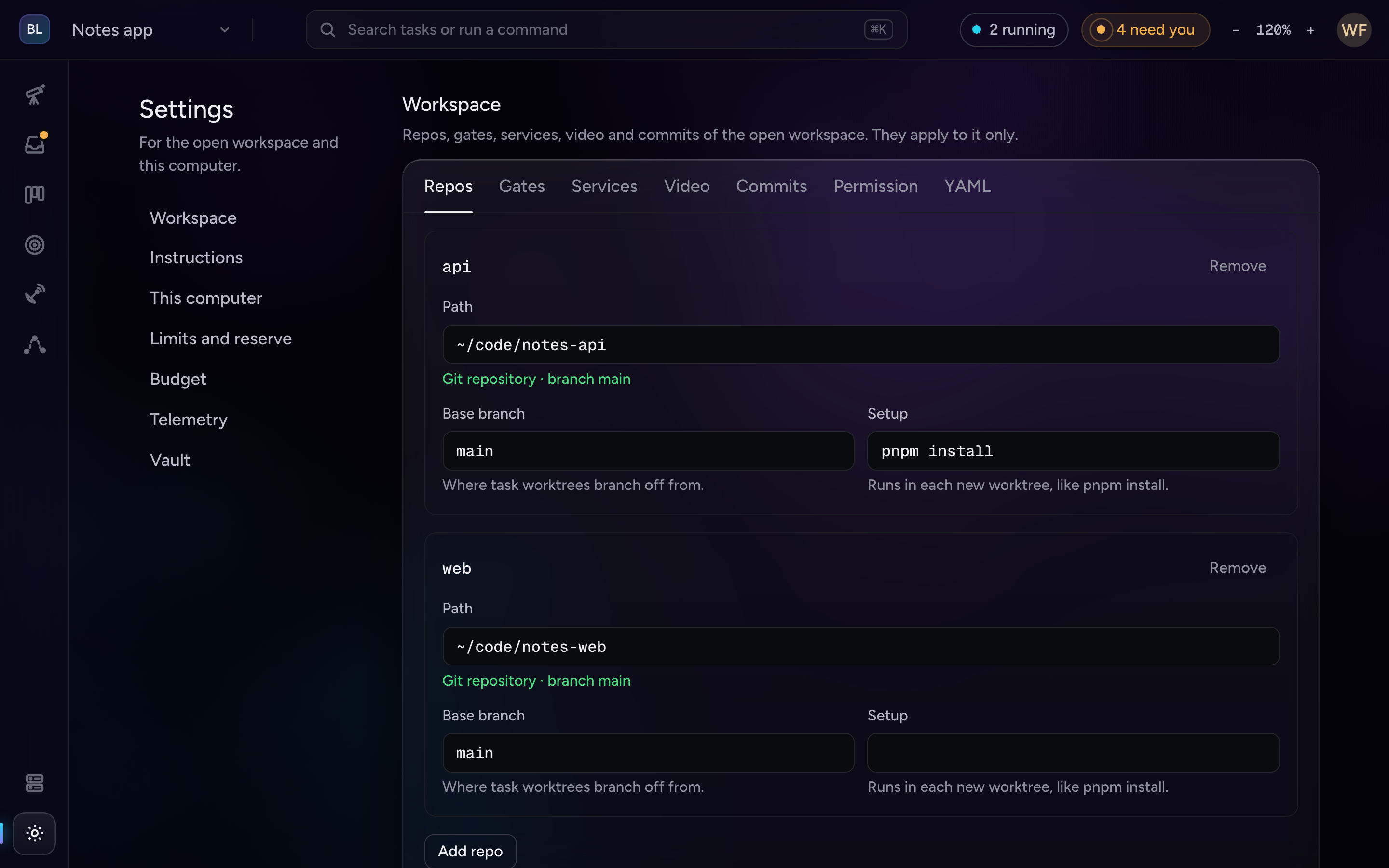
repos: api: path: ~/code/notes/api base_branch: mainThe name api is yours to choose; tasks use it to say which repos they touch. It takes letters, digits, dot, dash and underscore. For every task, Astranize makes a git worktree of this repo, a separate working copy on its own branch (astra/<task>-<slug>), so your main checkout is never touched.
Remove on a repo takes it out of config.yaml, with its gates and services. The repo folder itself is not touched.
Now ask the CLI to load the workspace:
astranize flow --workspace notesThe command prints the steps of the default flow, so the workspace loads. The default flow has no video step, so the file loads clean. If you add the optional video step to a flow, the video needs settings you add later in this guide. Until then, the file shows a warning instead of an error, A etapa de vídeo precisa da seção vídeo do config, and a task that reaches the video step asks you whether to skip it.
Prepare each worktree
Section titled “Prepare each worktree”A fresh worktree only has the files git tracks. It has no node_modules and no .env. Two keys fix that: setup runs a command once in each new worktree, and copy brings untracked files over from your main checkout. Setup is a field on the Repos tab; copy is only in the YAML tab.
repos: api: path: ~/code/notes/api base_branch: main setup: "npm ci" copy: [".env"]Copied files are hidden from git inside the worktree, so they never show up in the diff. A file in copy is skipped when it does not exist in the checkout, or when the worktree already has it.
Add the checks that must pass
Section titled “Add the checks that must pass”After the developer agent finishes, Astranize runs your checks before anyone reviews the change. Each check is a named command that must exit with code 0, and Astranize calls it a gate.
In the app, the Gates tab lists the gates of each repo with Name, Command and Time limit (s). Add gate adds one by hand, and Detect gates reads the repo’s package.json and offers each test, lint, typecheck or build script that is not a gate yet. In the file, you list them under gates:
repos: api: path: ~/code/notes/api base_branch: main setup: "npm ci" copy: [".env"] gates: - { name: tests, command: "npm test", timeout_seconds: 600 } - { name: lint, command: "npm run lint" }Gates run in order, inside the task’s worktree, in every repo the task touches. When one fails, the rest are marked skipped and the task goes back along the check step’s on_fail route, which is the developer in the default Flow. The last lines of the failing output go with it. A gate that runs past timeout_seconds (15 minutes by default) counts as failed.
Each gate’s full output is kept in runs/<task>/cycle-N/gates/<repo>-<name>.log, so you can read the whole log when the tail is not enough. Gates explains the idea in more depth.
Start your app for each task
Section titled “Start your app for each task”To record the optional video, the video agent needs your app running. Astranize starts it for you, and every task gets its own copy: its own processes, its own ports and, if your scripts create one, its own database. Two tasks never share a server.
Each process is a service. A service needs two things: a start command that keeps running, and a health URL that Astranize polls until it answers with a status below 500.
The Services tab edits them per repo, with Start, Health, URL, Stop, Setup, Time to start (s) and Depends on, and Add service creates one. The advanced keys of this section, seed, run_data and cleanup, are only in the YAML tab.
services: api: start: "node server.mjs --port {ports.api}" health: "http://localhost:{ports.api}/health"This block goes under the api repo, next to gates. The text in braces is a placeholder that Astranize fills in before running the command.
Give each task its own ports
Section titled “Give each task its own ports”{ports.api} asks for a free port. Astranize picks it once per task and uses the same number everywhere the placeholder appears, so start and health agree. The name after ports. is up to you: {ports.api}, {ports.db}, {ports.web}.
The ports a task got are saved in runs/<task>/services/ports.json.
Create and remove per-task data
Section titled “Create and remove per-task data”Most apps need data to show. Three optional commands handle it: setup runs before the service first starts for a task, seed runs once after it is healthy, and cleanup runs when the task’s environment is torn down.
services: api: setup: "node scripts/db.mjs create notes_{taskId}" start: "node server.mjs --port {ports.api}" health: "http://localhost:{ports.api}/health" seed: "node scripts/db.mjs seed notes_{taskId}" cleanup: "node scripts/db.mjs drop notes_{taskId}" start_timeout_seconds: 60{taskId} becomes the task’s id, such as t-0007, so each task gets a database of its own. If the video runs a second time for the same task, setup and seed are not repeated.
Start services in order
Section titled “Start services in order”The frontend usually needs to know where the API is. Add the web repo with its own service, and list api in depends_on:
web: path: ~/code/notes/web base_branch: main setup: "npm ci" gates: - { name: tests, command: "npx vitest run --passWithNoTests" } - { name: typecheck, command: "npx tsc --noEmit" } - { name: build, command: "npm run build" } services: web: start: "node server.mjs --port {ports.web} --api {services.api.url}" health: "http://localhost:{ports.web}" depends_on: [api]Astranize starts api, waits until it is healthy, then starts web. Because api is already up, web can use {services.api.url}, which is the origin of the api health URL (for example http://localhost:62396).
Service names are shared by the whole workspace, so two repos cannot both define a service called api.
Let the video agent log in
Section titled “Let the video agent log in”The video section tells the video agent where to open your app and how to get past the login screen.
In the app, the Video tab starts on “Video off”. Turn video on asks for the App address and the Playwright repo. Once on, Video data picks where the data comes from, and App sign-in picks No sign-in, Login script or Vault session; picking one removes the other from config.yaml. Turn video off removes the whole section. In the file:
video: base_url: "{services.web.url}" playwright_repo: web login: "node {workspaceDir}/scripts/login.mjs --base-url {services.web.url} --out {storageState}"base_urlis wherepage.goto('/')lands. Here it is the task’s ownwebservice.playwright_repois the repo whose Playwright install runs the recorded test. It must be one of yourrepos.loginruns once the services are healthy. It must sign in and save the browser session to the file{storageState}points at.
A script that writes a Playwright storage state is enough:
import { writeFileSync } from 'node:fs';const arg = (name) => process.argv[process.argv.indexOf(name) + 1];writeFileSync(arg('--out'), JSON.stringify({ cookies: [], origins: [] }));console.log(`logged in to ${arg('--base-url')}`);A real script would open --base-url with Playwright, sign in with a test account and call context.storageState({ path }). If you already saved a login session in the Vault, set session to its name instead of writing login. The Proof video guide covers what happens next.
Set the commit policy
Section titled “Set the commit policy”The Commits tab decides when Astranize commits a task’s work to its branch, whether your git hooks run, which files go in and what the message says. Every field starts on its default, which is one commit per developer cycle, hooks skipped, git add -A and chore(astra): {task_id} cycle {cycle}. In the file it is the commit section:
commit: when: per_task hooks: runCommits explains each choice and the per-task override.
Set the permission mode
Section titled “Set the permission mode”The Permission tab sets how much the agents may do without asking: Ask, Worktree or Free. Unlike the other tabs, it does not write config.yaml: the mode is a policy of this computer, kept in ~/.astranize/settings.yaml, and it applies from the next step that starts. See Permission modes.
Edit the whole file in the YAML tab
Section titled “Edit the whole file in the YAML tab”The forms cover the common keys. For everything else, and for when you would rather type, the YAML tab shows the whole config.yaml in an editor with line numbers and autocomplete for the keys: type ba inside a repo and it offers base_branch. Changes stay in the editor until you click Save; Discard brings back what is on disk. A draft survives a switch to another tab.
A save goes through the same checks as loading the workspace, so an invalid file is never written. The problems show under the editor, as “File errors”, one “Line N: …” per problem, with the line marked in the editor. A valid file with something worth knowing saves, and lists it under “File warnings”.
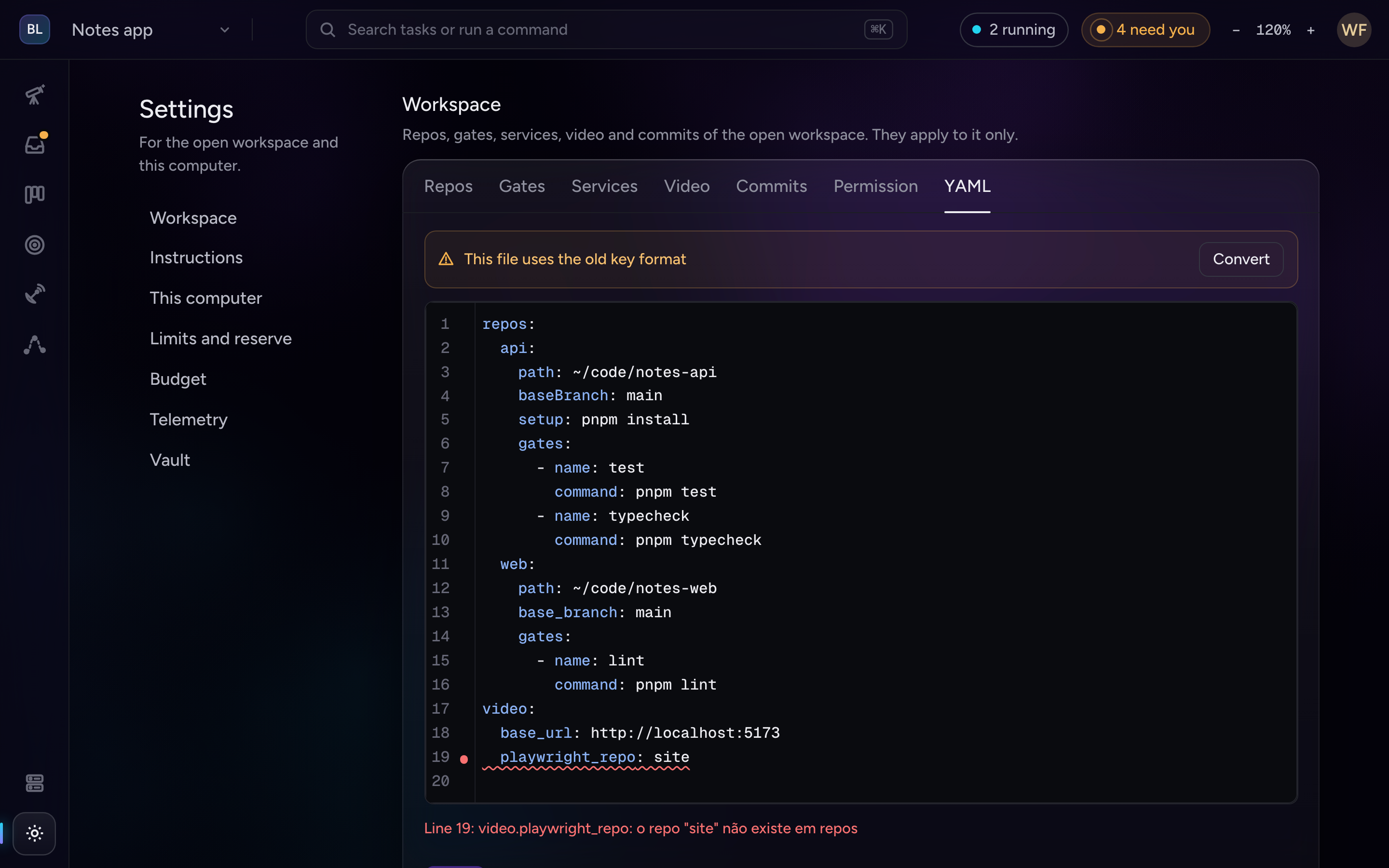
When config.yaml is so broken that the forms cannot read it, Settings opens the workspace on the YAML tab, and the other tabs say “The form cannot read this config.yaml. Fix it in the YAML tab.”
When the file changed on disk
Section titled “When the file changed on disk”The app remembers which version of the file you opened. If someone, or your own editor, changed config.yaml since then, a save writes nothing and shows “The file changed on disk”. Compare opens two read-only editors side by side, “On disk” and “Your version”, and Reload brings the disk version and drops yours. The forms work the same way: a form change on a file that changed shows the notice instead of writing over it.
Go back to an earlier version
Section titled “Go back to an earlier version”Every save keeps the version it replaced. Versions lists them under “Kept versions”, with the date and size, and Restore puts one back after asking “Restore the version from …? The current version stays in the history.” So a restore can be undone by restoring again.
The copies live in the workspace, under .history/config/config/. Astranize keeps the last 20 per file. To keep more or fewer, set documents.history_keep in ~/.astranize/settings.yaml.
Convert the old key format
Section titled “Convert the old key format”Keys used to be written in camelCase, such as baseBranch. Those files still load, but the YAML tab shows “This file uses the old key format” with a Convert button. Convert first shows what changes: “Files that change”, each with how many keys, across the whole open workspace and this machine’s settings.yaml. A copy of each file goes to the history before writing. Click Convert now. Save or discard your own changes first; Convert waits for a clean editor.
From the CLI, migrate-yaml-keys does the same, and --dry-run only reports:
astranize migrate-yaml-keys --workspace notes{"type":"yaml_keys","file":"~/.astranize/workspaces/notes/config.yaml","renamed":[{"from":"baseBranch","to":"base_branch"}],"status":"migrated"}{"type":"yaml_keys","file":"~/.astranize/workspaces/notes/workflow.yaml","renamed":[],"status":"unchanged"}{"type":"yaml_keys","file":"~/.astranize/workspaces/notes/flows/default.yaml","renamed":[],"status":"unchanged"}{"type":"yaml_keys_summary","dryRun":false,"migrated":1,"unchanged":2,"skipped":0,"backup":"~/.astranize/workspaces/notes/.history/migrate-yaml-keys/2026-11-22T043945.732Z"}It covers config.yaml, the flows, the Missions, the Probes and the task files of the workspace, plus the machine’s settings.yaml. See migrate-yaml-keys.
Rename or move the workspace to the trash
Section titled “Rename or move the workspace to the trash”The Workspace section ends with a danger zone. Both actions refuse while a task of the workspace runs or waits in the queue, and while any task still has worktrees: archive and delete those tasks first, and the refusal names them.
- Rename workspace asks for the New name (lowercase letters, digits and dashes) and moves the tasks, policies and settings with it. The app then opens the workspace under its new name. A workspace with secrets scoped to it in the Vault cannot be renamed until you move those secrets.
- Move to trash asks you to type the workspace name to confirm, then moves the whole folder to
~/.astranize/trash/<name>-<date>/, with its policies. Nothing is deleted. The app switches to another workspace, or, when it was the only one, opens the New workspace wizard.
From the CLI they are workspace rename <from> <to> and workspace delete <name>; see the CLI reference.
Check the config
Section titled “Check the config”-
Start the services once, outside any task.
services-checkruns them in your main checkouts with the task idt-0000, prints their URLs, then stops them and runscleanup.Terminal window astranize services-check --workspace notes --repos api,web{"type":"services","urls":{"api":"http://localhost:62396","web":"http://localhost:62397"}}The logs and ports land in
~/.astranize/workspaces/notes/services-check/:services-check/api.log db create notes_t-0000db seed notes_t-0000db drop notes_t-0000 -
Load the whole workspace, config and Flow together.
Terminal window astranize flow --workspace notes{"type":"flow","flow":{"name":"default","label":"Default","subject":"task","maxReturns":3,"steps":[{"id":"ideator","type":"ideate","actor":"agent"},{"id":"approval","type":"approval","actor":"you"},{"id":"developer","type":"develop","actor":"agent"},{"id":"gates","type":"check","actor":"check"},{"id":"reviewer","type":"review","actor":"agent"},{"id":"video","type":"video","actor":"agent"},{"id":"validation","type":"validation","actor":"you"}]}} -
Run each gate command by hand in a checkout. Gates and repo
setuponly run inside a task, soservices-checkdoes not test them.
The complete example
Section titled “The complete example”Here is the whole file, with a short comment on each line:
display_name: Notes # name shown in the app (max 60 characters)repos: api: path: ~/code/notes/api # main checkout; ~ is expanded base_branch: main # task branches and worktrees start here setup: "npm ci" # runs once in each new worktree copy: [".env"] # untracked files copied from the checkout gates: - { name: tests, command: "npm test", timeout_seconds: 600 } - { name: lint, command: "npm run lint" } services: api: setup: "node scripts/db.mjs create notes_{taskId}" # once per task start: "node server.mjs --port {ports.api}" # long-running process health: "http://localhost:{ports.api}/health" # polled until < 500 seed: "node scripts/db.mjs seed notes_{taskId}" # once, after healthy cleanup: "node scripts/db.mjs drop notes_{taskId}" # when the task ends start_timeout_seconds: 60 web: path: ~/code/notes/web base_branch: main setup: "npm ci" gates: - { name: tests, command: "npx vitest run --passWithNoTests" } - { name: typecheck, command: "npx tsc --noEmit" } - { name: build, command: "npm run build" } services: web: start: "node server.mjs --port {ports.web} --api {services.api.url}" health: "http://localhost:{ports.web}" depends_on: [api] # api starts first, its url is available herevideo: base_url: "{services.web.url}" # where the Playwright spec opens pages playwright_repo: web # repo whose Playwright install runs the spec login: "node {workspaceDir}/scripts/login.mjs --base-url {services.web.url} --out {storageState}"Good to know
Section titled “Good to know”Keys are snake_case
Section titled “Keys are snake_case”Every key is snake_case: base_branch, timeout_seconds, depends_on. The older camelCase spelling (baseBranch) still loads, with one warning per file on stderr, and the app offers to convert it:
warning: ~/.astranize/workspaces/legacy/config.yaml: camelCase keys are deprecated, use snake_case (baseBranch → base_branch)Writing both spellings of the same key in one object is an error, and nothing loads:
{"type":"error","message":"~/.astranize/workspaces/legacy/config.yaml: repos.api: use either base_branch or baseBranch, not both"}Names you choose yourself (repo names, service names, keys under cli.*.env and slots) are kept exactly as you write them.
Typos fail loudly
Section titled “Typos fail loudly”Unknown keys are rejected, so a misspelled key stops loading instead of being ignored:
repos.api.gates.0: Unrecognized key(s) in object: 'timeout'The same goes for placeholders: an unknown one fails with Unknown placeholder: {name} before anything runs.
When a repo path, or a {workspaceDir}/... path in a command, does not exist, Astranize loads the file but warns on stderr:
warning: ~/.astranize/workspaces/notes/config.yaml cites a path that does not exist: ~/code/notes/siteChoose the shell
Section titled “Choose the shell”On macOS and Linux every command runs with sh -c. On Windows the default is Git Bash, so the same commands work on both systems. For a Windows-only workspace you can set shell: powershell or shell: cmd; on macOS or Linux that is an error (shell: powershell only exists on Windows). Placeholders are quoted for the shell in use.
Services and the video agent’s data
Section titled “Services and the video agent’s data”The video agent can write a small data script for the scenario it records. To run it, give one service a run_data command that contains {file}. Only one service in the workspace may have run_data, and like seed it must point at per-task data.
Service commands receive ASTRANIZE_NAME_PREFIX (astra) in their environment, so your scripts can name per-task resources the same way Astranize does.
When health is not a full URL (for example /health), set url yourself. Otherwise the file is refused with cannot derive url: health is not an absolute URL, set url explicitly.
All options
Section titled “All options”Top-level keys
Section titled “Top-level keys”| Key | Type | Default | What it does |
|---|---|---|---|
repos |
map | required, may be {} |
One entry per repo, keyed by the name tasks use. An empty map loads with the warning Nenhum repo ainda. |
video |
object | none | Used by the video step. Without it, that step asks whether to skip the video. |
commit |
object | see Commits | when, hooks, stage and message. |
default_flow |
Trajectory name | default |
The Trajectory new tasks use. Make default on the Trajectories screen writes it. |
display_name |
string | none | Workspace name in the app, 1 to 60 characters. |
logo |
string | none | Workspace logo. |
shell |
bash, powershell, cmd |
see Choose the shell | Shell for every command in this file. |
cli |
object | claude and codex |
command and env for each agent CLI. |
error_tail_lines |
integer | 80 |
Lines of gate output kept for the error tail. |
slots |
map of integers | {} |
Capacity slots by name. |
policies |
object | none | providers and budgets overrides. See Economy and limits. |
Repo keys
Section titled “Repo keys”| Key | Type | Default | What it does |
|---|---|---|---|
path |
string | required | Main checkout. ~ is expanded. |
base_branch |
string | required | Branch that task branches start from. |
setup |
string | none | Runs once in each new worktree, timeout 15 minutes. |
copy |
list of paths | [] |
Files copied from the checkout into each worktree, such as .env. |
gates |
list | [] |
Checks that run after the developer step. |
services |
map | {} |
Processes started for the video step. |
Worktrees live under ~/.astranize/workspaces/<ws>/worktrees/<task>/<repo>.
Gate keys
Section titled “Gate keys”| Key | Type | Default |
|---|---|---|
name |
string | required |
command |
string | required |
timeout_seconds |
integer | 900 |
Service keys
Section titled “Service keys”| Key | Type | Default | When it runs |
|---|---|---|---|
start |
string | required | Started as a long-running process. |
health |
string | required | URL polled every 500 ms until it answers below 500. |
url |
string | origin of health |
Value of {services.<name>.url}. |
setup |
string | none | Before the first start for this task. |
seed |
string | none | Once per task, after the service is healthy. |
run_data |
string | none | Runs the data script the video agent writes. Must contain {file}. |
data_extension |
string | none | Fixed extension for that script, such as php. |
data_file |
string | none | Fixed file name, such as VideoSeeder.php. Wins over data_extension. |
stop |
string | none | Before the process is killed. |
cleanup |
string | none | When the task’s environment is torn down. |
depends_on |
list | [] |
Services that must be healthy first. A cycle is an error. |
start_timeout_seconds |
integer | 90 |
How long to wait for health. |
Video keys
Section titled “Video keys”| Key | Type | Default | What it does |
|---|---|---|---|
base_url |
string | required | Base URL for page.goto('/'). |
playwright_repo |
string | required | Repo whose Playwright install runs the spec. Must be in repos. |
login |
string | none | Command that logs in and writes {storageState}. Runs in the Playwright repo’s worktree. Timeout 5 minutes. |
session |
string | none | Name of a saved login session in the Vault. Use login or session, not both. |
slow_mo_ms |
integer | 700 |
Playwright slow motion, so the video is watchable. |
hold_ms |
integer | 1500 |
Pause on the final state of each criterion. |
data |
environment or mock |
environment |
mock is for frontend-only projects: the spec fakes the API with page.route. |
Placeholders
Section titled “Placeholders”| Placeholder | Available in |
|---|---|
{workspaceDir} |
everywhere |
{taskId} |
everywhere, such as t-0007 |
{repo}, {worktree} |
repo setup, gates, services, video.login (the Playwright repo) |
{ports.<name>} |
everywhere |
{services.<name>.url} |
services started after <name>, video.base_url, video.login |
{storageState} |
video.login only: the file your login script must write |
{file} |
run_data only |
Common errors
Section titled “Common errors”| Message | Fix |
|---|---|
A etapa de vídeo precisa da seção vídeo do config (warning) |
Add the video section, or use a Flow with no video step. Until then, tasks ask whether to skip the video. |
nome de repo inválido "Api X": use letras, números, _ . e - |
A repo key with spaces or other characters. |
cannot derive url: health is not an absolute URL, set url explicitly |
Set url on a service whose health is relative. |
repos.api.services.api.dependsOn.0: unknown service "db" |
Define the service, or remove it from depends_on. |
video.playwrightRepo: unknown repo "web" |
playwright_repo must name a key under repos. |
video.session: use either login or session, not both |
Keep one. |
runData must contain {file} |
Use seed for a fixed command. |
duplicate service name "api" (already defined in repo "web") |
Service names are global to the workspace. |
repos not in workspace: site |
services-check --repos takes names from repos. |
Next steps
Section titled “Next steps”- Commits for the Commits tab in depth.
- Build a Flow to change the steps a task walks through.
- Set up the proof video to see the services and login in action.
- YAML keys for every key in one place.
- CLI reference for
services-checkandflow.