
What is Astranize
What Astranize does for you, how a task goes from your idea to a branch you can trust through any coding agent, and what is ready today.
Astranize is a desktop app with a task board where AI agents do the work and you only step in to decide. You write down what you want, agents plan it and build it, your own tests check it along the way, and you review the result in one screen. It runs on your machine with the coding agent CLI you already use.
The problem it solves
Section titled “The problem it solves”You probably already use a coding agent every day. One agent in one terminal works well. Several tasks across a few repos do not: you lose track of which session is waiting on you, you explain the same repo again every time, and “done” still means checking out the branch, running the tests and clicking through the app yourself.
Astranize takes that bookkeeping off you. It keeps every task on a board, runs each one through the same checks, and only interrupts you when it needs a decision.
How a task gets done
Section titled “How a task gets done”Every task follows a list of steps called a flow. The app calls it a Trajectory, and the files call it a flow. You can make your own, but every workspace starts with the default flow: ideator, approval, developer, gates, reviewer, summary and validation. Here is what happens along the way.
Agents do the writing
Section titled “Agents do the writing”Each agent step calls a runner, which runs the agent’s CLI with a prompt from your workspace and a fixed set of tools it is allowed to use. The flow does not depend on which agent is behind the step. Today the Claude Code runner ships, so the step runs the claude CLI. The tools depend on the job. For example, the ideator can only read your code, while the developer can edit files and run npm, pnpm, npx and read-only git commands.
Your commands do the checking
Section titled “Your commands do the checking”You tell Astranize which shell commands prove a change is good, like npm test or npm run lint. These are called gates. Astranize runs them on the task’s copy of the code, and when one fails it sends the end of the output back to the developer to fix.
The final review is the proof
Section titled “The final review is the proof”After the review, a cheap agent writes a short summary: what was done, how, what to watch out for, and a simple step-by-step guide to test it by hand. The final review screen puts it next to the code, the criteria and your gates. If you want to watch each criterion happen, the optional video add-on records one clip per criterion against the task’s own running app.
You decide at fixed points
Section titled “You decide at fixed points”Two steps always wait for you: approving the spec before any code is written, and the final review at the end. Anything else that needs you, like an agent asking which approach to take or a task that got stuck, arrives as a decision: a short question with options to pick from.
Each task stays isolated
Section titled “Each task stays isolated”Every task gets its own git worktree and branch in each repo, so tasks never step on each other or on your own checkout. If you configure services, each task also gets its own ports, so two tasks can run the app at the same time.
What you see when you open it
Section titled “What you see when you open it”When you open the desktop app, you land on the board of your workspace. Every task is a card, and the column it sits in tells you who has it: an agent writing the spec (Ideating), you (For you), the agents and your checks (Running), nobody because it got stuck (Blocked), or nobody because it is finished (Done).
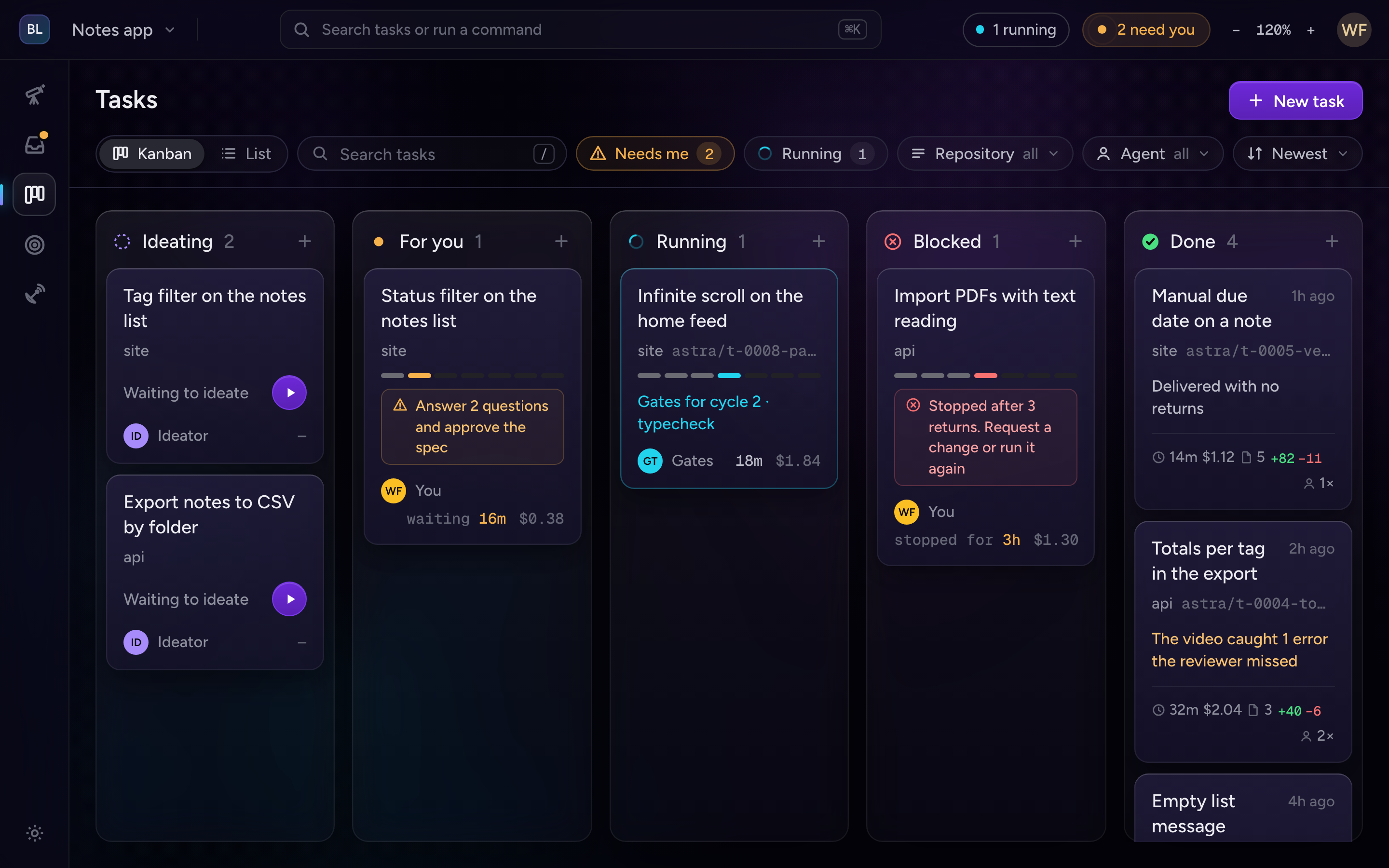
Most of your day happens in three places. For you collects every question and approval waiting on you. A task’s session lets you watch it run live and send the agent a note. The validation screen is the final review, where you read the summary, check the code and approve the result criterion by criterion. Tour of the app walks through every screen.
What runs where
Section titled “What runs where”Astranize has three parts, and all of them share one data folder.
| Part | What it is | Where it runs |
|---|---|---|
| Desktop app | The board, the “For you” inbox, the live session, the final review screen, the Observatory, Missions, Probes, Trajectories, Fleet and Settings. This is where you work. | Your desktop |
| Daemon | A background process that queues tasks and starts them as your machine has room. It keeps running when you close the app. It only listens on 127.0.0.1, with a token. |
In the background, one per data folder |
| CLI | The astranize command. The app drives it for you; you call it yourself for scripts and automation. Every command prints JSON lines. |
Your terminal |
The data folder holds your workspaces, tasks, runs, worktrees, settings and the encrypted Vault. It is ~/.astranize unless you set ASTRANIZE_HOME. Because the app and the CLI read the same folder, you can mix them: create a task from a script and validate it in the app.
Commands that change a task (create, ideate, approve, adjust, run, validate, stop, decide, retry, archive) go through the daemon. Commands that only read, like list, status and decisions, answer directly. CLI conventions has the full split.
What is ready today
Section titled “What is ready today”- The default flow end to end, with the Claude Code runner (the
claudeCLI) as the agent. The runner is a plug point, so the flow does not change when more agents arrive. - A final review screen with summary, test guide, code per commit, criteria and gates. Recorded video is an optional add-on.
- A first-use wizard that creates a workspace in six steps, with no YAML: name, repos, suggested gates, optional video, permission and commits.
- Workspaces with several repos, per-repo gates and per-task services with their own ports, all editable from Settings, with a YAML tab, kept versions and a trash instead of deletes.
- A commit policy per workspace, with an override per task: when to commit, which hooks run and what goes in.
- Tasks you can edit and delete, and an ideator that never writes to your repos unless the flow says so.
- The daemon queue, which admits tasks by machine capacity and can be paused, resumed and limited.
- Decisions and the “For you” inbox, instructions sent while a task runs, retries and adjustments.
- The desktop app on macOS and Windows, with the board, For you, the live session, validation, the Observatory, Missions, Probes, Trajectories, Fleet and Settings.
- Custom flows, Missions and Probes, created and edited in the app or written as files.
- Usage tracking, limits, budgets and Telemetry thresholds.
- The Vault for secrets, with its key in the macOS Keychain, in Windows Credential Manager, or behind a master password.
- Connected machines (Fleet), from the app or the CLI.
Next steps
Section titled “Next steps”- Tour of the app shows every screen of the desktop app.
- Installation gets the app running.
- Your first workspace points Astranize at a repo.
- Flows explains how steps hand work to each other.