
Commits
When Astranize turns a task's work into a git commit on its branch, which hooks run, what goes in and what the message says.
The developer agent never commits. It edits files in the task’s worktree, and Astranize commits that work for it, on the task’s own branch, at moments you choose. By default it makes one commit at the end of every developer cycle, skips your git hooks, includes every file and writes a message like chore(astra): t-0001 cycle 1. You can change each of those choices for the whole workspace, and override them for a single task.
This set of choices is called the commit policy. It lives in the commit section of the workspace’s config.yaml, and a task can carry its own commit override in its task file.
Pick when to commit
Section titled “Pick when to commit”The first choice is when the work becomes a commit. There are three answers:
| Setting | In the app | What happens |
|---|---|---|
per_cycle |
Every dev cycle | One commit in the worktree after each developer cycle. This is the default. |
per_task |
Once per task | A single commit, when you approve the validation. |
never |
Never | No commit at all. The diff stays in the worktree, uncommitted. |
With per_cycle, the branch tells the story of the task: cycle 1, then the fix after a failing gate in cycle 2, and so on. With per_task, the branch ends up with one commit that holds the approved work, and nothing lands on it while you are still reviewing. With never, you take the changes from the worktree yourself, for example to commit them by hand with your own message.
The reviewer and the video do not care which one you pick. They read the worktree, so they see the work the same way whether it was committed or not.
Where per_task commits
Section titled “Where per_task commits”With per_task, the commit happens when you validate the delivery and every criterion is approved. Astranize commits first and only then marks the task done. If a Trajectory has no validation step, the commit happens instead when the task reaches the end of its flow, and Settings warns you: “The default Trajectory has no validation step: the commit happens when the task is done.”
The “no commit” badge
Section titled “The “no commit” badge”The validation screen shows a “no commit” badge next to “Waiting for your validation” when the delivery has no commit on the branch: always with never, and also with per_cycle when no cycle produced a commit. The same fact is in the task’s report.json as "commit": "none".
Set the policy for the workspace
Section titled “Set the policy for the workspace”Open Settings, Workspace, and pick the Commits tab. It has four fields: When to commit, Git hooks, What goes in the commit and Message. Each field saves as soon as you change it, and a field you never touched shows a default mark.
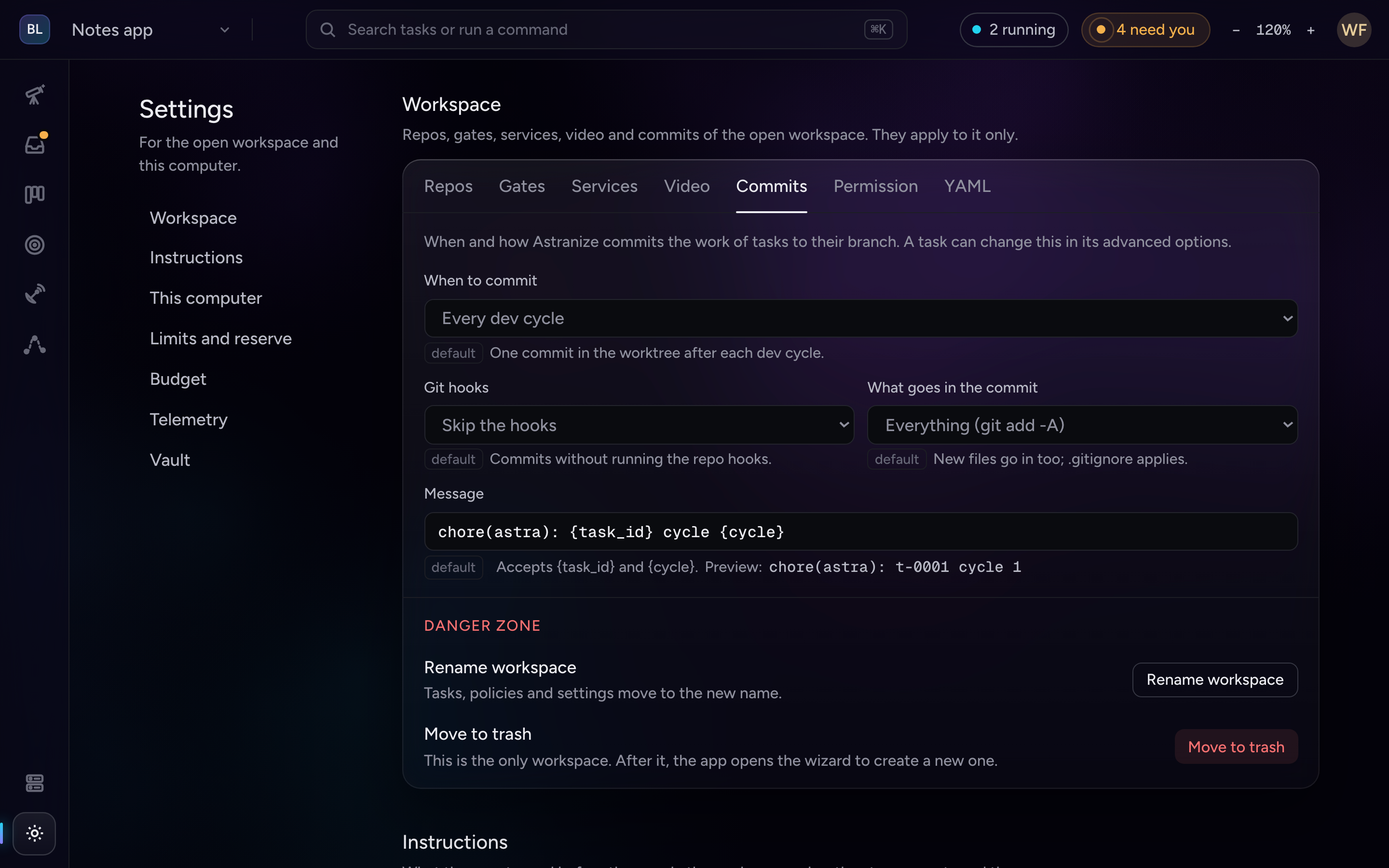
use default next to a field you changed removes that key from config.yaml, so the field follows the default again. You also pick these four choices in step 5 of the New workspace wizard.
Write the commit section in config.yaml. Every key is optional, and a key you leave out keeps its default:
commit: when: per_task hooks: run stage: tracked message: "feat(notes): {task_id}"To change one key without opening an editor, use doc save with a patch. It refuses to write when the file changed since you read its hash:
astranize doc save config --workspace notes --expect-hash=sha256:2adebe… --patch='[{"op":"set","path":["commit","when"],"value":"per_task"}]'{"type":"document_saved","kind":"config","name":"","hash":"sha256:eebe78…","validation":{"ok":true,"errors":[],"warnings":[]}}doc get config --workspace notes prints the current hash. Documents covers doc.
Run your git hooks
Section titled “Run your git hooks”By default Astranize commits with your repo’s hooks turned off, so a slow or picky pre-commit hook never stops a task. Set Git hooks to Run the hooks (hooks: run) when you want them, for example to run your formatter on every commit. Each commit then gets up to 10 minutes for its hooks.
When a hook refuses a cycle’s commit, the task does not crash. It stops with a decision, “The commit hook failed”, and the changes stay in the worktree:
| Option | What it does |
|---|---|
| See output | Shows what the hook printed. It is kept as runs/<task>/cycle-N/commit-hook.log. |
| Try again | Commits again with the hooks, without calling the agent. Use it after you fixed the hook. |
| Commit without hooks | Commits this cycle skipping the hooks, and the task goes on. |
| Stop | The task is blocked with “You stopped at the failed commit hook.”, and the changes stay in the worktree. |
With per_task, the hook runs when you approve the validation. When it refuses, the validation screen says “The web repo’s commit hook refused the delivery commit. The task stays in validation.” and offers See output, Try again and Commit without hooks. Nothing is marked done until the commit goes through.
A commit that fails for another reason, such as git having no user.name and user.email set, blocks the task with “Git refused the commit.” instead. Set them with git config and retry.
Choose what goes in
Section titled “Choose what goes in”What goes in the commit (stage) decides which files the commit picks up:
- Everything (git add -A),
all, the default. New files go in too, and.gitignoreapplies. - Only tracked files (git add -u),
tracked. Files git did not know before stay out of the commit, and remain in the worktree.
Write the message
Section titled “Write the message”The Message is a template. Two placeholders are filled in for each commit: {task_id}, such as t-0001, and {cycle}, the developer cycle number. With per_task, {cycle} is the last cycle the task ran. Any other placeholder is refused when you save, with unknown placeholder {ticket}; use {task_id}, {cycle}.
commit: message: "feat(notes): {task_id} cycle {cycle}"The default is chore(astra): {task_id} cycle {cycle}. When a developer cycle ends with the agent asking you a question, its commit message gets decision at the end, so you can tell those commits apart in the log.
Override the policy for one task
Section titled “Override the policy for one task”Any task can follow its own policy, while the rest of the workspace keeps the default.
In the New task dialog, open Advanced. It holds the same four fields as the Commits tab, starting on the workspace’s values. While you leave them alone, it says “Left alone, the task follows the workspace commits.” As soon as you change one, Advanced is marked “commit changed”, and each changed field gets a use default link that sets that one field back.
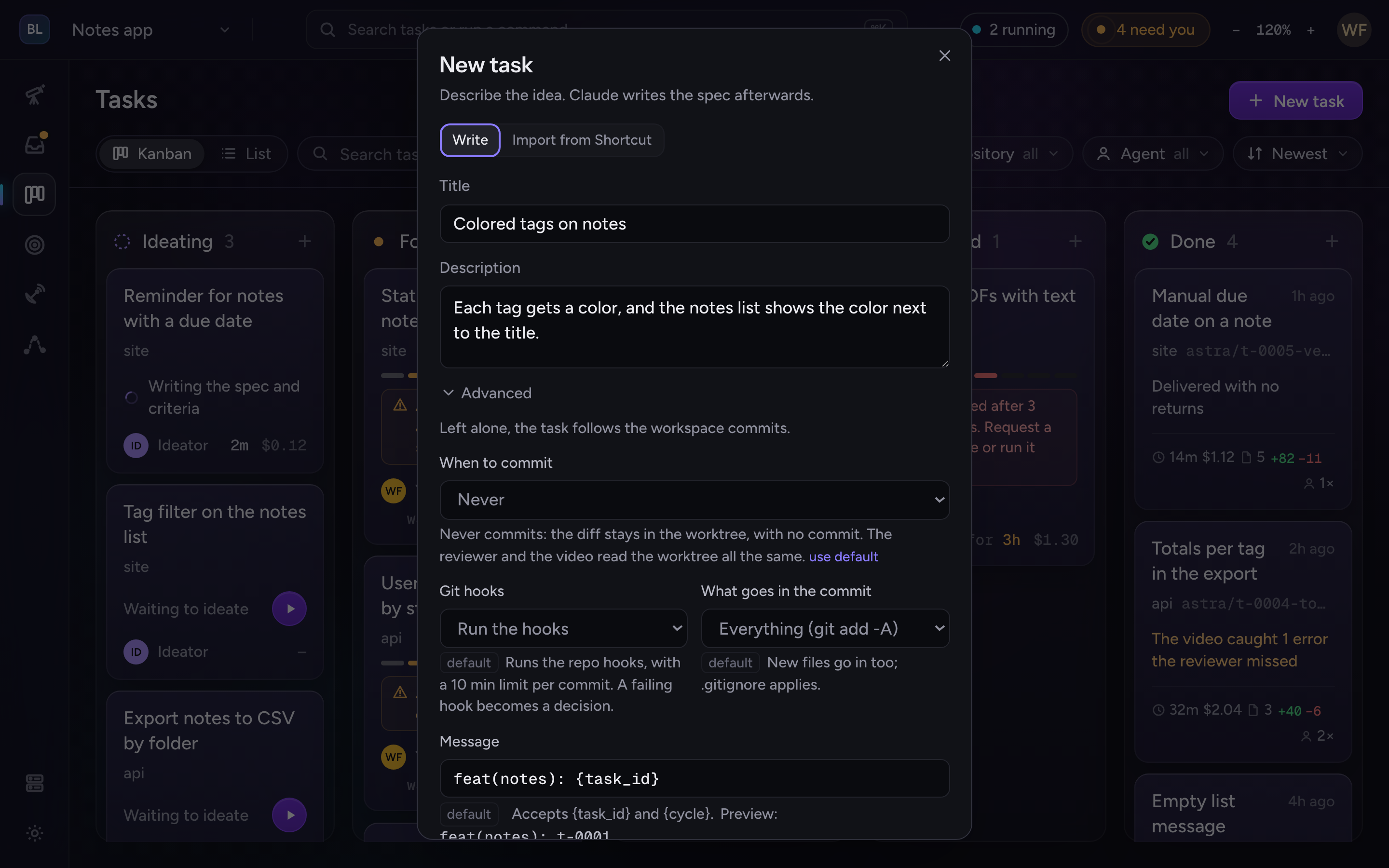
For a task that already exists, use the Commit pill in the session’s composer, next to the model pill. It shows the task’s current choice (“Per cycle”, “Per task” or “Never”) and offers Workspace default plus the three choices. Workspace default removes the task’s whole override: when, message, hooks and what goes in. On a running task, a change applies from the next cycle.
create takes the override as JSON in --commit. Only the keys you set are stored:
astranize create --workspace notes --title "Tag colors" --description "Each tag gets a color" --commit '{"when":"never"}'{"type":"task_updated","task":{"id":"t-0001","title":"Tag colors",…,"commit":{"when":"never"}}}edit changes it later. --commit null removes the override, so the task follows the workspace again:
astranize edit t-0001 --workspace notes --commit '{"when":"per_task","message":"feat(notes): {task_id}"}'astranize edit t-0001 --workspace notes --commit nullThe override is written to the task file, as a commit block in its frontmatter:
commit: when: per_task message: "feat(notes): {task_id}"For each key, the task’s value wins, then the workspace’s, then the default.
Good to know
Section titled “Good to know”- Commits always land in the task’s worktree, on its branch, such as
astra/t-0001-tag-colors. Nothing is pushed. - With
never, the worktree holds all of the task’s work. Deleting the task warns you about it, and keeps the uncommitted diff as a patch in the trash. See Tasks. - An override is limited to 1 KB. The app refuses a longer one before saving: “The message is too long: the task commit override goes over 1 KB. Shorten the message.”
- A task that runs on another machine of your Fleet has no Commit pill here; it reads “Commit only on the task’s computer”.
- The Commit pill is off for an archived task.
- Astranize writes the message to a temporary file and passes it to git, so quotes and line breaks in the message are safe.
All options
Section titled “All options”| Key | Values | Default | In the app |
|---|---|---|---|
commit.when |
per_cycle, per_task, never |
per_cycle |
When to commit |
commit.hooks |
skip, run |
skip |
Git hooks |
commit.stage |
all, tracked |
all |
What goes in the commit |
commit.message |
text with {task_id} and {cycle} |
chore(astra): {task_id} cycle {cycle} |
Message |
The same four keys are accepted in a task’s commit override, in create --commit and in edit --commit.
| Error | Cause |
|---|---|
--commit não é JSON válido |
The --commit value does not parse. |
--commit inválido followed by when: Invalid enum value. Expected 'per_cycle' | 'per_task' | 'never', received 'sometimes' |
A value outside the list. |
message: unknown placeholder {ticket}; use {task_id}, {cycle} |
A placeholder other than the two above. |
Next steps
Section titled “Next steps”- Tasks explains how a task moves and how to edit or delete one.
- Write config.yaml walks through the other tabs of the workspace settings.
- Decisions covers the other questions a task can stop on.