
Probes
A probe watches a schedule or a source such as Shortcut and, when something new matches your rule, starts a mission or creates a task for you.
A probe starts work for you, so you do not have to remember to. It either fires at set times, like “every Thursday at 9am”, or keeps an eye on a source such as Shortcut and fires when a new item matches a rule you wrote in plain words, like “bugs assigned to me that are ready for development”.
When a probe fires, it starts a mission or creates a task in a flow (the app calls a flow a Trajectory). It never acts on its own beyond that: the work it starts still stops for your decisions like any other.
Fire a mission on a schedule
Section titled “Fire a mission on a schedule”The simplest probe runs a mission at set times. Nothing fires until you turn the probe on.
Open Probes from the left rail and click New probe. Leave Type on Schedule, give it a Name, and choose How it fires:
- Days and time: pick the Days and one or more Times. Another time adds a time.
- Every: a number of minutes or hours, at least 15 minutes.
Pick the Mission it fires and click Save off, or Save and turn on. When the Probes screen is empty, the example “Every Thursday at 9am” opens this form already filled in.
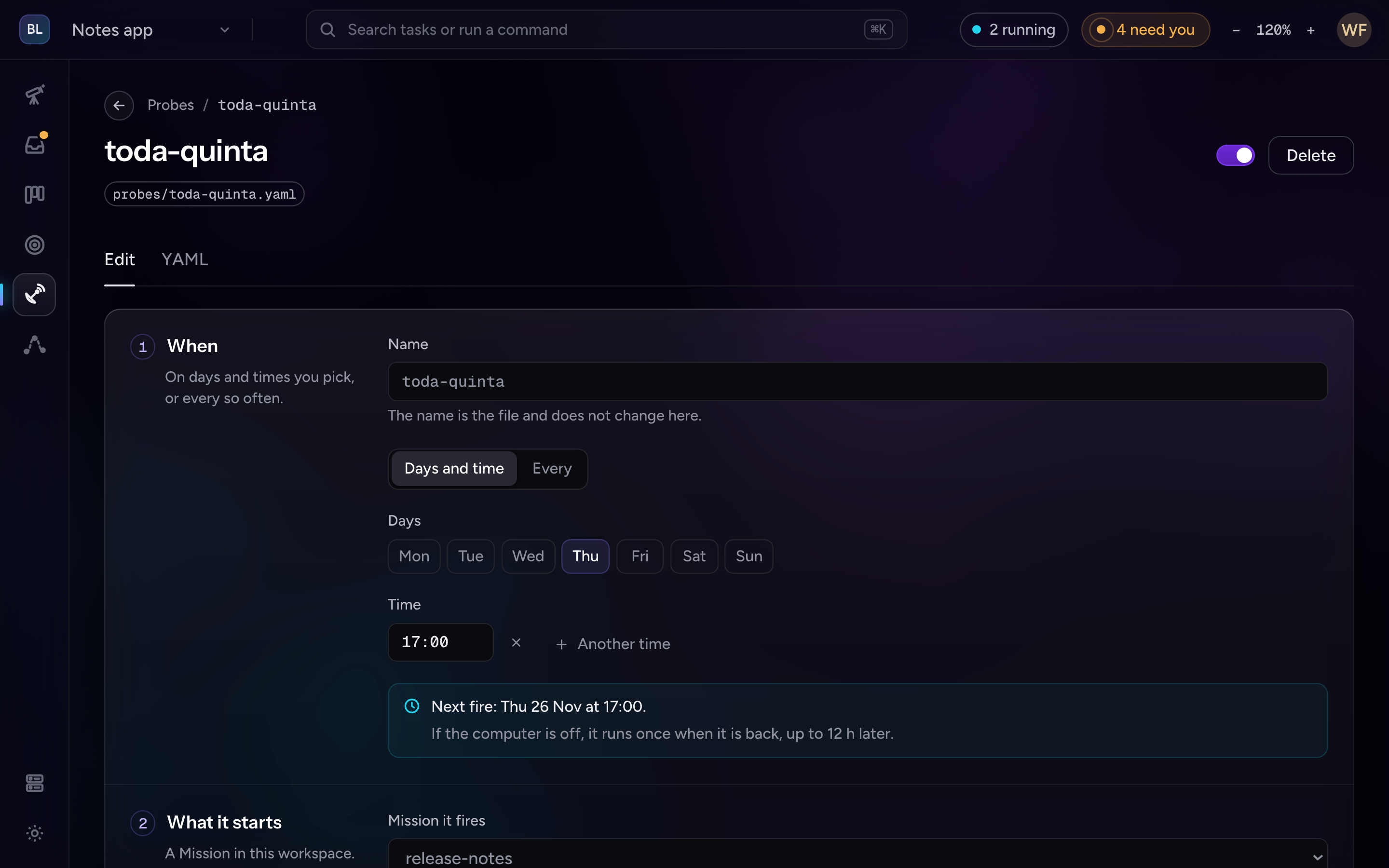
Once the probe is on, the form shows its next fire. If the computer is off at that time, the probe runs once when it is back, up to 12 hours later.
Save this file in the workspace’s probes/ folder:
label: Nightly backupschedule: { days: [mon, tue, wed, thu, fri], at: "02:00" }fires: { mission: backup-notes }Then turn it on:
astranize probe enable nightly-backup --workspace notes{"type":"probe","probe":{"name":"nightly-backup","label":"Nightly backup","enabled":true,"kind":"schedule","schedule":{"days":["mon","tue","wed","thu","fri"],"at":["02:00"]},"fires":{"mission":"backup-notes"},"nextFireAt":"2026-11-20T05:00:00.000Z","held":0,"failing":0,"pendingBaseline":null,"openDecisions":0,"usesAi":false,"aiCallsThisMonth":0}}nextFireAt says when it fires next. Every weekday at 02:00 it starts the backup-notes mission.
A schedule is either days (mon to sun) with one or more at times (HH:MM), or every with an interval such as 30m or 2h (at least 15 minutes). A schedule probe can only start a mission.
If the mission asks before running (Ask before running, on the mission’s page), each fire opens a request in For you. Schedule fires do not pile up: while the previous request is still open, a new fire only updates its time instead of adding a second request.
Turn a probe on and off
Section titled “Turn a probe on and off”Each probe has an on/off switch, both on its row in the Probes list and at the top of its page. The app confirms with “Probe nightly-backup is on” or “Probe nightly-backup is off”. From the CLI, use probe enable and probe disable.
The Probes list shows each probe with its Next fire, its Last fire and the switch. You can filter it to All, Schedule or Watch.
Watch a source for new items
Section titled “Watch a source for new items”The second kind of probe watches a source. Every few minutes it asks the source for items that match your rule, and fires for each one it has not seen before.
Click New probe and choose Watch as the Type. The example “New story in Shortcut” on the empty Probes screen opens the same form.
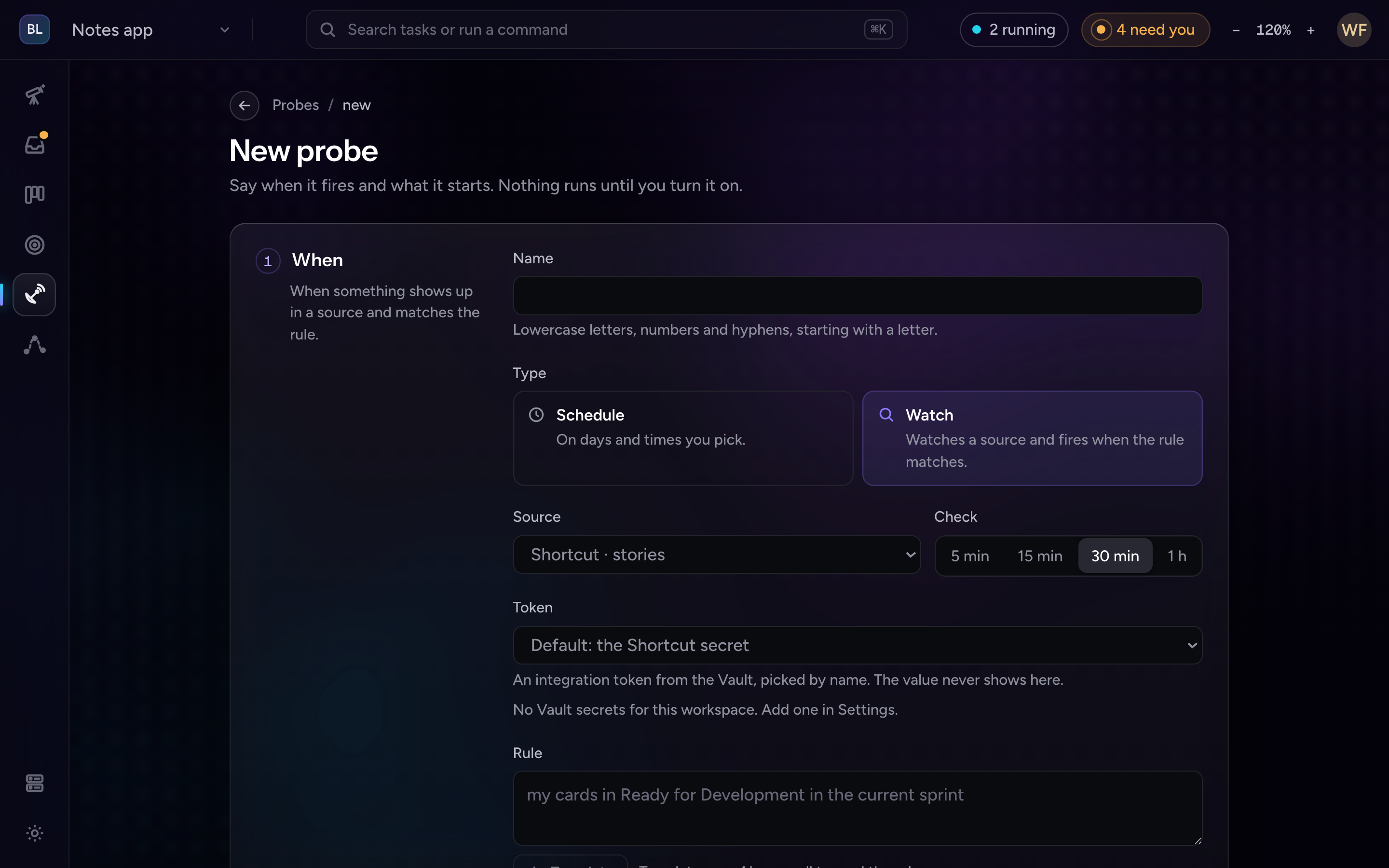
- Pick the Source (today only Shortcut · stories) and how often to Check: 5 min, 15 min, 30 min or 1 h.
- Pick the Token, an integration token from the Vault chosen by name. By default the probe uses the secret named
Shortcut. The value never shows on screen. - Write the Rule in plain words and click Translate. Translating uses AI: one call to read the rule. The filters it finds show up as chips you can remove. Anything that did not become a filter is shown too, because AI checks it on each new item.
- Under What it starts, pick a Mission, or a Trajectory and the column The new task goes into: Triage, Backlog or Ideate.
- Under Limits, set Most per hour (1 to 60). Anything past that waits as held fires, and you decide in For you.
- Click Create.
The app then looks at what already matches the rule. When nothing does, it offers Turn on. When some items already match, it says “3 items already match the rule today. They do not fire on their own. Fire for them now?” Yes turns the probe on and fires for them; No turns it on and only fires for new items. Leave it off keeps the probe off.
label: Bug stories for mewatch: { provider: shortcut, source: stories, every: 15m }rule: text: "Bugs assigned to me that are ready for development"fires: { flow: default, on_new: ideate }limits: { max_per_hour: 2 }This probe checks Shortcut stories every 15 minutes. Each new bug assigned to you becomes a task in the default flow, and the ideator starts on it right away (on_new: ideate). It fires at most twice an hour.
It reads Shortcut with the integration token named Shortcut. To use another one, add token: vault:<name> under watch.
Translate the rule with probe rule bug-stories, then turn it on with probe enable bug-stories --baseline ignore (only new items fire) or --baseline fire (the items already there fire too).
Write the rule in your own words
Section titled “Write the rule in your own words”You write the rule as a sentence. Before the probe can use it, Astranize turns it into filters the source understands. In the app that is the Translate button; in the CLI it is probe rule:
astranize probe rule bug-stories --workspace notesA small model (haiku) reads your sentence and writes two things back into the probe file:
filters, the part Shortcut can search directly, such as owner ismeand type isbug;residual, whatever is left that filters cannot say.
When there is a residual, the same small model checks each new item against it. When everything became a filter, the app says so: the checks spend no tokens.
The probe file keeps a fingerprint of the text it translated. If you change the rule later, the probe’s page warns “The rule changed since it was last translated” and offers Translate again, so you can check the new filters before the probe fires on them. To see a translation without saving it, use probe translate --source shortcut.stories --text "<rule>".
A rule needs at least one filter Shortcut can search on (owner, state, labels, …), so a probe never downloads your whole Shortcut workspace.
What happens when a probe fires
Section titled “What happens when a probe fires”The daemon checks each enabled watching probe every watch.every, and fires schedule probes at their times. Run probe poll <name> to check a watching probe now.
- The first time a probe sees items, they existed before you turned it on. That first batch is called the baseline. If you did not choose when turning it on, a “First query” card in For you asks: fire for the current items, or ignore them so only new ones fire.
- After that, an item is new when its id, or its version (Shortcut’s
updated_at), was not seen before. - For a mission, the run starts, or first asks you in For you when the mission has Ask before running on. When several items arrive at once, the card lets you run all of them, choose some, or skip. For a flow, the story is imported as a task (like
import-shortcut) and starts in the column you chose. A story that already has a task is recorded as a duplicate instead. - Past Most per hour, extra fires wait. A “Held fires” card in For you offers Fire now (all of them, past the limit this once), Wait for the next hour, or Discard.
Fires that fail are retried and listed as failing with their last error. On the probe’s row, the Last fire column says what the probe did, for example “started weekly-digest” or “created t-0012 in the Trajectory default”.
Edit or delete a probe
Section titled “Edit or delete a probe”A probe’s page has two tabs, Edit and YAML. A schedule probe opens in the same form you used to create it; the name is the file and does not change here. A probe that watches a source is edited in the YAML tab.
Delete, next to the switch, asks “Delete nightly-backup?” and reminds you that a copy stays in the version history. A probe that still has work pending cannot be deleted yet: the app lists the decisions waiting for you and the fires still to go out. Answer them in For you, or wait for the fires to go out, then try again.
Deleting a probe moves what it remembers (the items it has seen, its fires) to the trash with it, so a new probe with the same name starts clean. To bring a probe back, scroll down the Probes list to Deleted and click Restore.
All options
Section titled “All options”Probe keys
Section titled “Probe keys”Probes are YAML files at ~/.astranize/workspaces/<ws>/probes/<name>.yaml.
| Key | Default | Meaning |
|---|---|---|
enabled |
true |
Whether the daemon checks it. |
schedule |
For a schedule probe: days with at, or every. |
|
watch.provider, watch.source |
For a watching probe: the source, shortcut and stories. |
|
watch.every |
30m |
How often to check, at least 5m. |
watch.token |
the Shortcut secret |
vault:<name>: the integration token to read the source with. |
rule.text |
The rule in your words. | |
rule.filters, rule.residual, rule.compiled |
Written by the translation: the filters, the leftover, and the fingerprint of the translated text. | |
fires.mission |
Start this mission for each new item. | |
fires.flow, fires.on_new |
Create a task in this flow. on_new is triage, backlog or ideate. |
|
limits.max_per_hour |
3 |
Fires per hour, 1 to 60. Extra fires are held. |
dedupe_by |
Item fields that make two items the same. | |
group_window_minutes |
Group items that arrive close together. |
Shortcut story fields
Section titled “Shortcut story fields”| Field | Operators | Notes |
|---|---|---|
owner |
is, is_not, in |
Mention names; me is you. |
state |
is, is_not, in |
Workflow state name. |
iteration |
is, is_not, in |
current is the current iteration. |
labels |
has, has_not |
|
type |
feature, bug or chore. |
|
epic, estimate, deadline |
Good to know
Section titled “Good to know”- Each check of a new item against the residual is a model call, counted in
aiCallsThisMonthon the probe. Translating a rule counts as one call too. - What a probe has already seen is kept in
probes/<name>/seen.json. - A probe name has at most 64 characters.
- The only source today is Shortcut stories (
shortcut.stories).
Next steps
Section titled “Next steps”- Missions: what a probe usually starts
- Decisions: how For you asks about baselines and held fires
- Vault: the
Shortcuttoken - Missions and probes commands