
Decisions
A decision is a question Astranize asks you, with clear options to pick from, whenever a task cannot go on without you.
Sometimes a task cannot go on without you. The spec is ready and needs your approval, the developer found two reasonable ways to build something, or a step crashed. Instead of leaving you a chat message to interpret, Astranize asks a clear question with a list of options, says what each option leads to, and often marks the one it recommends. That question is called a decision.
Every open decision shows up on the For you screen in the desktop app. You pick an option, or write your own answer when the decision allows it, and the task picks up where it stopped.
A decision, from question to answer
Section titled “A decision, from question to answer”Say the developer, in cycle 1, sees two ways to filter notes and the spec does not say which one you want. It stops and asks. You can list the open decisions from the CLI (output trimmed):
astranize decisions --workspace notes --task t-0001{"type":"decisions","decisions":[ {"id":"D-1","taskId":"t-0001","kind":"approval","step":"approval","title":"The spec for Add a tag filter to the notes list is ready","context":"0 questions and 1 acceptance criteria.","options":[],"allowFreeText":true,"urgency":"normal","status":"resolved","answer":{"optionId":"approve"}}, {"id":"D-2","taskId":"t-0001","kind":"agent","step":"developer","cycle":1,"title":"Pick a filter","context":"Two ways to filter.","options":[{"id":"O-1","label":"Follow the story","consequence":"Inactive users show up."}],"allowFreeText":false,"urgency":"blocking","status":"open"}]}D-1 was the spec approval, already answered. D-2 is the developer’s question, still open. Answering it resumes the developer:
astranize decide t-0001 D-2 --option O-1 --workspace notes --follow{"type":"decision_resolved","taskId":"t-0001","decision":{"id":"D-2","status":"resolved","answer":{"optionId":"O-1"},...}}{"type":"queued","taskId":"t-0001","position":1}{"type":"step_started","taskId":"t-0001","step":"developer","cycle":1,"model":"sonnet"}{"type":"step_finished","taskId":"t-0001","step":"developer","cycle":1,"outcome":"passed"}The answer was recorded, the task went back into the queue, and the developer finished cycle 1 with your choice.
What a decision contains
Section titled “What a decision contains”Every decision has the same parts, whatever asked it:
- a short title, the question itself;
- a context paragraph with what you need to know;
- options, each with a label and its consequence, and sometimes one marked as recommended;
- evidence when it helps, such as a file, a diff, a log, a video or a link;
- a free text field, when your own answer makes sense.
Decisions are numbered per task: D-1, D-2, and so on. The full list of fields is in Decision fields at the end of this page.
What makes a task stop and ask
Section titled “What makes a task stop and ask”Most decisions come from the flow itself:
- The ideator finished the spec, and you approve it or ask for changes.
- The proof is ready, and you validate each acceptance criterion.
- An agent hit a choice it cannot make alone.
- An
actionstep wants your go before it runs. - A
waitstep is waiting on something outside Astranize, and you can resolve it by hand. - The task blocked, and you choose how to continue.
Missions and probes open their own decisions too, for example to confirm a run. Every kind is listed in Kinds of decisions.
Astranize also asks on behalf of its own rules:
- Budget: “The task went over its budget (US$ 6.12 of 6.00)”, with
continue(recommended) andstop. See Economy and limits. - Permission: “The agent asked for a permission”, with
allow_once,allow_always(saves the rule to the workspacepermissions.yaml) anddeny. See Permission modes. - Vault locked: see below.
How an agent asks a question
Section titled “How an agent asks a question”Agents are told to ask only when the choice changes the result and cannot be worked out from the code, the spec or your earlier answers. They can ask at most 3 questions per step per cycle.
To ask, the agent ends its reply with a block like this:
{ "needsDecision": { "title": "Pick a filter", "context": "Two ways to filter.", "options": [{ "label": "Follow the story", "consequence": "Inactive users show up.", "recommended": true }], "allowFreeText": false, "evidence": [{ "label": "export", "kind": "file", "ref": "api/src/notes/list.ts:42" }] }}Then three things happen:
- With the default commit policy, one commit per developer cycle, the work so far is committed in the worktree, so nothing is lost while you think.
- The task goes to
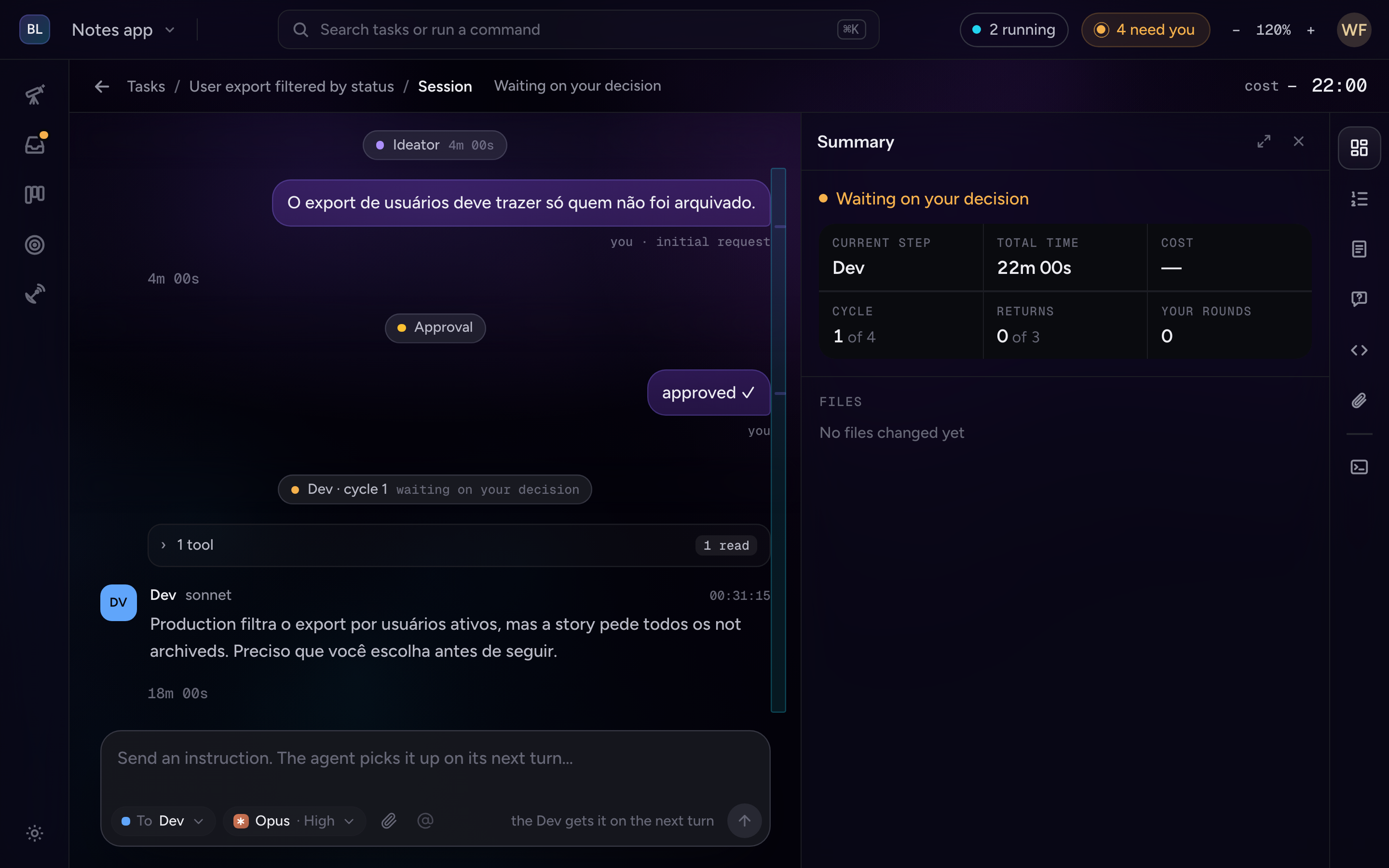
waiting_youand shows up in the For you column. - When you answer, the task goes back into the queue ahead of new work, and the agent reads your answer on its next turn.
In the task’s session, the agent’s message appears in the timeline and the summary panel says Waiting on your decision:
If you want to steer an agent before it asks, see Mid-run instructions.
Vault locked
Section titled “Vault locked”When a step needs a secret and the Vault is locked, the step does not fail. It pauses with this decision: “Vault locked: open Astranize on this machine and unlock the Vault. This step needs a secret stored there.” Its one recommended option, “Try again”, runs the step again once the Vault is open.
If the Vault is unlocked but the secret is not in it, the task blocks with reason secret_unavailable:<step> instead.
When a task blocks
Section titled “When a task blocks”A blocked task opens a blocked decision with the ways out:
{"kind":"blocked","title":"Blocked: agent_crashed:developer","context":"The task stopped. Choose how to continue.","options":[{"id":"retry","label":"Try again","consequence":"Restarts from the developer in a new cycle."},{"id":"adjust","label":"Request adjustment","consequence":"Goes back to ideation with your comment."},{"id":"archive","label":"Archive","consequence":"Removes the task from the board; history and artifacts stay."}],"urgency":"blocking","id":"D-3","status":"open"}A task you stopped yourself (stopped_by_you) is blocked too, but it does not count as needing you.
How you answer
Section titled “How you answer”Open For you from the left rail. It lists every open decision across tasks, missions and probes. Each card shows the question, the options with what each one leads to, the recommended one, the evidence, and a free text field when allowed. Pick an option and click Confirm.
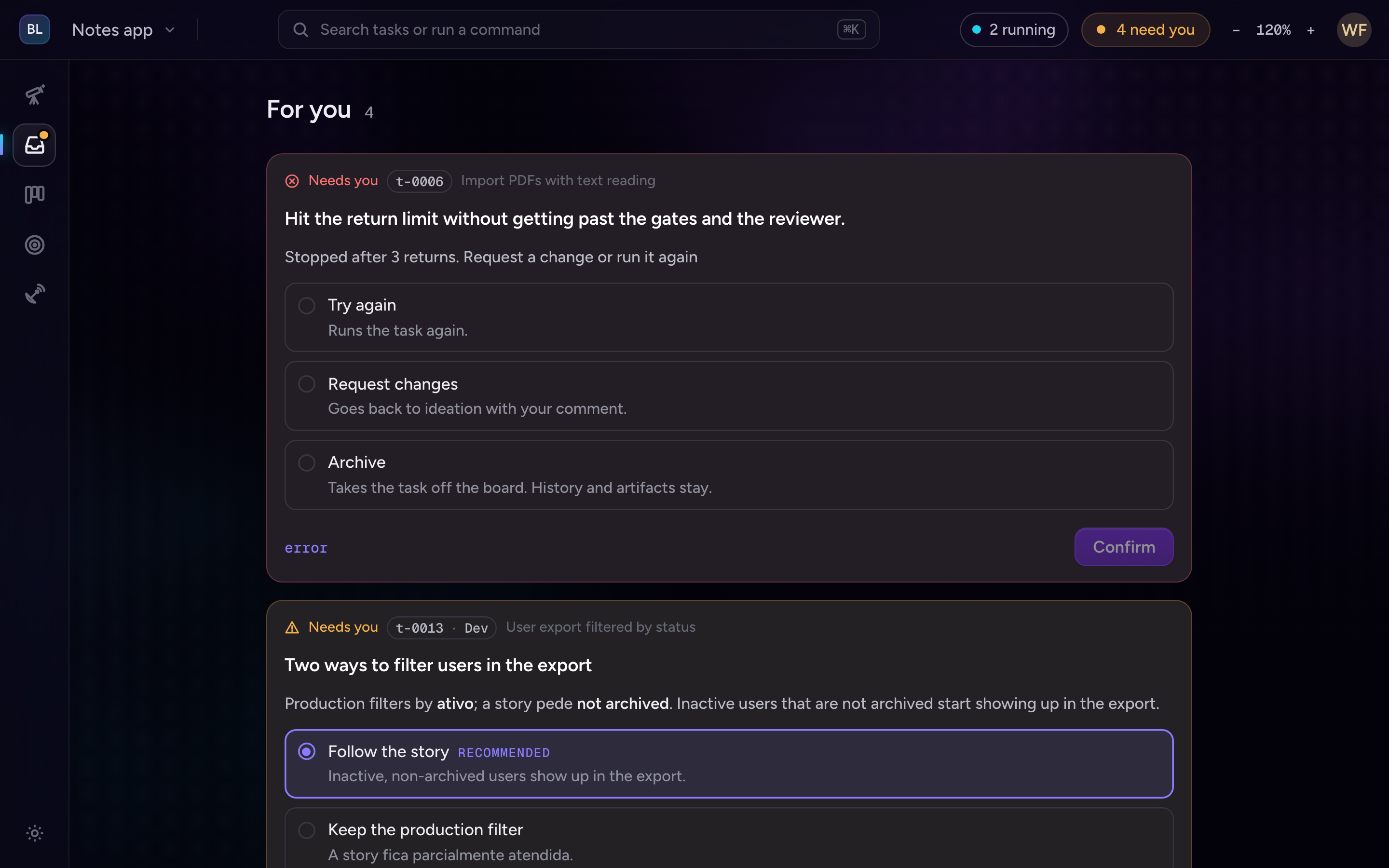
An approval card opens the spec with Answer questions, and a validation card opens the validation screen with Validate delivery. The board’s For you column holds the same tasks, and the app sends a system notification when a new decision opens.
List open and past decisions for the workspace, or for one task:
astranize decisions --workspace notesastranize decisions --workspace notes --task t-0001Answer with an option, with free text, or with both when the option is editable:
astranize decide t-0001 D-2 --option O-1 --workspace notes --followastranize decide t-0001 D-2 --text "Use tags from the note body" --workspace notesMissions and probes use --mission or --probe:
astranize decide D-1 --mission weekly-release --option run --workspace notesastranize decide r-0003 D-2 --mission weekly-release --option retry --workspace notesastranize decide D-4 --probe bug-stories --option fire --workspace notesProbe decisions take --option only: ignore or fire for a baseline, and wait, fire_now or discard for held items. A mission confirmation takes run or skip (and pick when it lists items).
All options
Section titled “All options”Kinds of decisions
Section titled “Kinds of decisions”| Kind | Opened when | Answered with |
|---|---|---|
approval |
The ideator finished the spec. | approve, or adjust with a comment |
validation |
The proof is ready for you. | validate --file verdict.json |
agent |
An agent step asked a question with a needsDecision block. |
decide |
action |
An action step in prepare or notify mode needs your go. |
decide |
wait |
A wait step is waiting on something outside. One option per outcome. |
decide, or the watcher resolves it |
blocked |
The task stopped. Options: retry, restart, adjust, archive. |
retry, adjust, archive |
mission_confirm, mission_rounds |
A mission needs confirmation or more rounds. | decide --mission |
probe_baseline, probe_held |
A probe found items for the first time, or held items. | decide --probe |
Decision fields
Section titled “Decision fields”Decisions are stored per task in runs/<task>/decisions.json.
| Field | Meaning |
|---|---|
id |
D-1, D-2, … numbered per task. |
kind |
What paused. See the table above. |
step, cycle |
Where it paused, when it applies. |
title, context |
The question, at most 80 and 600 characters. |
options |
Each has an id, a label, a consequence, and optionally recommended: true or editable (an option whose text you edit before confirming). |
allowFreeText |
Whether you can answer with your own text. |
evidence |
Links that back the question: file, diff, log, video, url or text. |
urgency |
blocking or normal. |
status |
open, resolved or superseded. |
answer |
{ optionId, text } once resolved. |
Good to know
Section titled “Good to know”decide checks your answer against the decision and refuses one that does not fit:
Unknown option O-9 for decision D-2Decision D-2 does not accept free textDecision D-2 is already resolvedTask t-0001 is not awaiting a decision (status "running")Next steps
Section titled “Next steps”- Tasks:
waiting_youand the For you column - Mid-run instructions: steer an agent without waiting for it to ask
- Vault
- Commits: when the work becomes a commit, and what happens when a hook refuses it
- CLI reference