
Trajectories
A Trajectory is the list of steps a task goes through, such as spec, code, tests, review and your validation. You edit it in the app or as a YAML flow file.
A Trajectory is the recipe a task follows. It lists the steps in order: write the spec, wait for your approval, write the code, run the tests, review, write a summary, wait for your final review. A recorded video is an optional step you can add. Each step says who acts, whether that is an agent, a shell command, you, or something outside Astranize. When a step finds a problem, the Trajectory says where the work goes back to.
The app calls it a Trajectory. On disk and in the CLI it is a flow: a YAML file in the workspace’s flows/ folder, and the config key is default_flow. This page says Trajectory for what you see in the app and flow for the file. Every workspace starts with one, named default, and you can add as many as you like.
The Trajectories screen
Section titled “The Trajectories screen”Open Trajectories in the sidebar to see every Trajectory of the workspace. Each row shows its label and file name, how many steps it has and how many open tasks use it. The one new tasks get is tagged default.
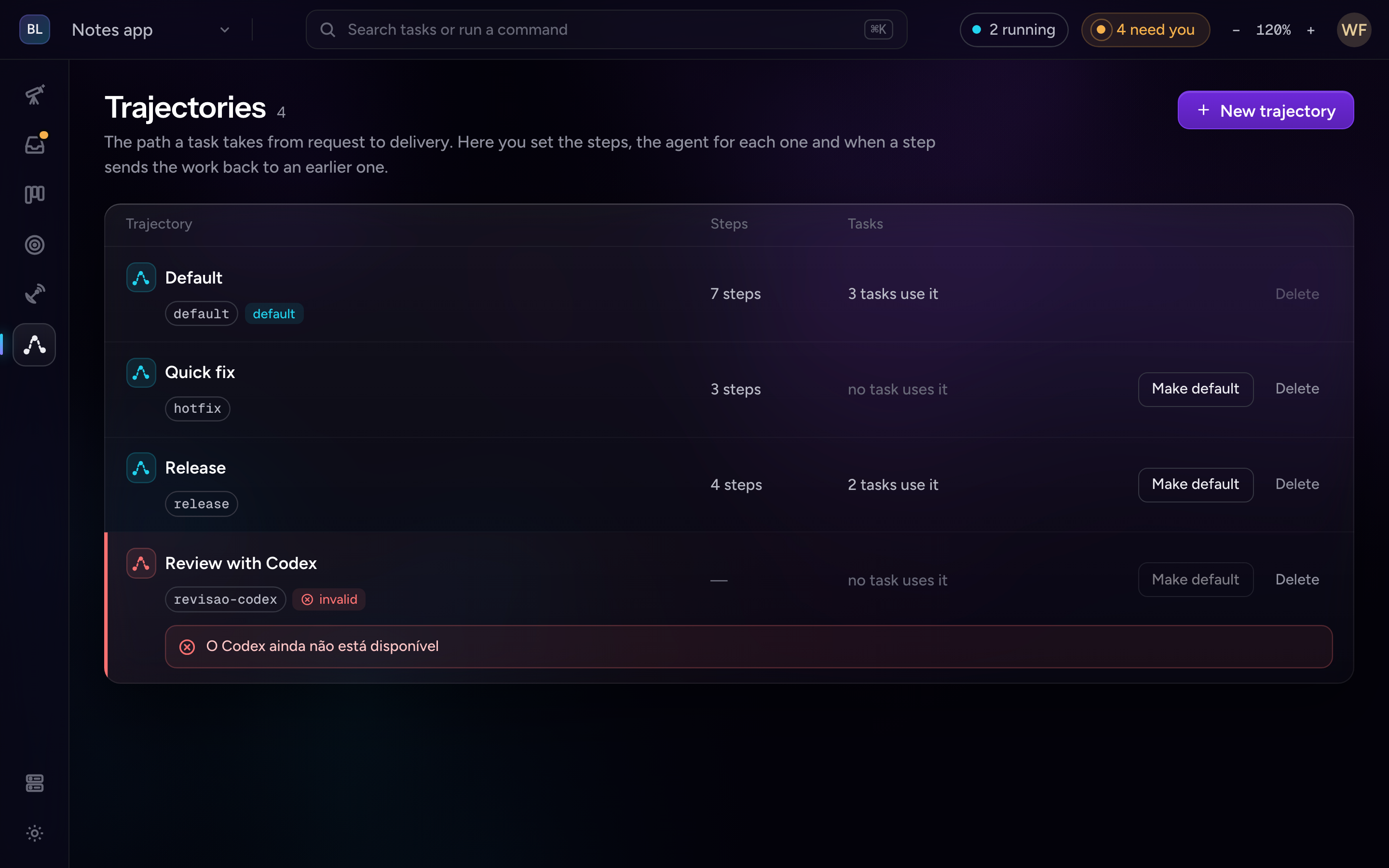
From this screen you can:
- create one with New trajectory;
- make one the default for new tasks with Make default;
- delete one with Delete;
- open one by clicking its row.
A Trajectory whose file has an error is tagged invalid and shows the error under its name. No task can use it, and you cannot make it the default, until you fix it.
The default flow
Section titled “The default flow”This is the flow Astranize ships, and the one New trajectory copies when you pick From the default template. Read it top to bottom: each entry is one step.
version: 2name: defaultlabel: Defaultsubject: taskmax_returns: 3 # the 4th automatic return blocks the tasksteps: - id: ideator type: ideate # spec, repos, questions, criteria executor: claude prompt: prompts/ideator.md tools: [Read, Grep, Glob] # read-only downgrade: { model: sonnet, effort: low } - id: approval type: approval # you approve, or adjust back to the ideator routes: { adjust: ideator } - id: developer type: develop # writes code in the worktrees executor: claude prompt: prompts/developer.md tools: [Read, Grep, Glob, Edit, Write, 'Bash(npm *)', 'Bash(pnpm *)', 'Bash(npx *)', 'Bash(git status*)', 'Bash(git diff*)'] model: sonnet subagents: true - id: gates type: check # test, lint, typecheck, build per repo on_fail: developer # a failing gate starts a new cycle - id: reviewer type: review # reads the diff, checks each criterion executor: claude prompt: prompts/reviewer.md tools: [Read, Grep, Glob, 'Bash(git diff*)', 'Bash(git log*)'] model: opus on_reject: developer - id: summary type: summary # what was done, how, attention points, test guide executor: claude prompt: prompts/summary.md tools: [Read, Grep, Glob, 'Bash(git diff*)', 'Bash(git log*)'] model: sonnet effort: low - id: validation type: validation # the final review: you read, check and decide routes: { reject: developer, rethink: ideator }A workspace made with init starts with the same seven steps in the older version 1 file, workflow.yaml. It runs the same way, but the app’s step form does not edit it and Duplicate… does not offer it. To get an editable copy, create a Trajectory From the default template.
From the CLI, flow prints the steps of the workspace’s default flow, with who acts on each:
astranize flow --workspace notes{"type":"flow","flow":{"name":"default","label":"Default","subject":"task","maxReturns":3,"steps":[{"id":"ideator","type":"ideate","actor":"agent"},{"id":"approval","type":"approval","actor":"you"},{"id":"developer","type":"develop","actor":"agent"},{"id":"gates","type":"check","actor":"check"},{"id":"reviewer","type":"review","actor":"agent"},{"id":"summary","type":"summary","actor":"agent"},{"id":"validation","type":"validation","actor":"you"}]}}Give it a task id and it prints the flow that task runs on instead: astranize flow t-0001 --workspace notes.
How a flow runs
Section titled “How a flow runs”Astranize walks the steps from top to bottom:
- It enters the first step and sets the task status from the step type (
running,waiting_youorwaiting_others). - Whoever acts on the step does the work: the agent writes, the command runs, or you decide.
- If the step passes, the task moves to the next step.
- If the step fails or rejects, the task goes back to the step its route names. When that step is the developer, a new cycle starts.
- After the last step passes, the task is
done.
Who does each step
Section titled “Who does each step”Every step has an id, which you choose, and a type, which decides who acts and what happens. The default flow uses seven types:
ideate: an agent reads your repos and writes the spec, the repos involved, questions for you and the acceptance criteria. It only reads, unless you turn oncan_write.approval: you approve the spec or ask for changes.develop: an agent writes the code in the task’s worktrees.check: Astranize runs the gates, your test, lint and build commands.review: an agent reads the diff and the gate results and approves or rejects each criterion.summary: a cheap agent writes what was done, how, points of attention and a step-by-step guide to test it. It never fails the task. If it fails, the final review opens with “Summary unavailable” and the other tabs still work.validation: the final review screen. You approve or reject each criterion, or request changes.
The video type is not in the default flow. It is an optional add-on: add it between reviewer and summary, and add a video section to config.yaml. See Set up the proof video.
There are more types for other kinds of work: a generic agent with your own prompt, an action that calls GitHub, Slack or a command, a wait for something outside Astranize, a triage, a handoff to another flow and a parallel group. They are all listed in Step types at the end of this page.
Open a Trajectory
Section titled “Open a Trajectory”Click a row on the Trajectories screen to open it. The header shows the label, the number of steps and the return limit. The Steps tab draws the steps as an orbit, one node per step in order, and lists the Trajectory’s warnings below it. A dot on a node means that step has a warning.
Click a node to open that step’s form under the orbit:
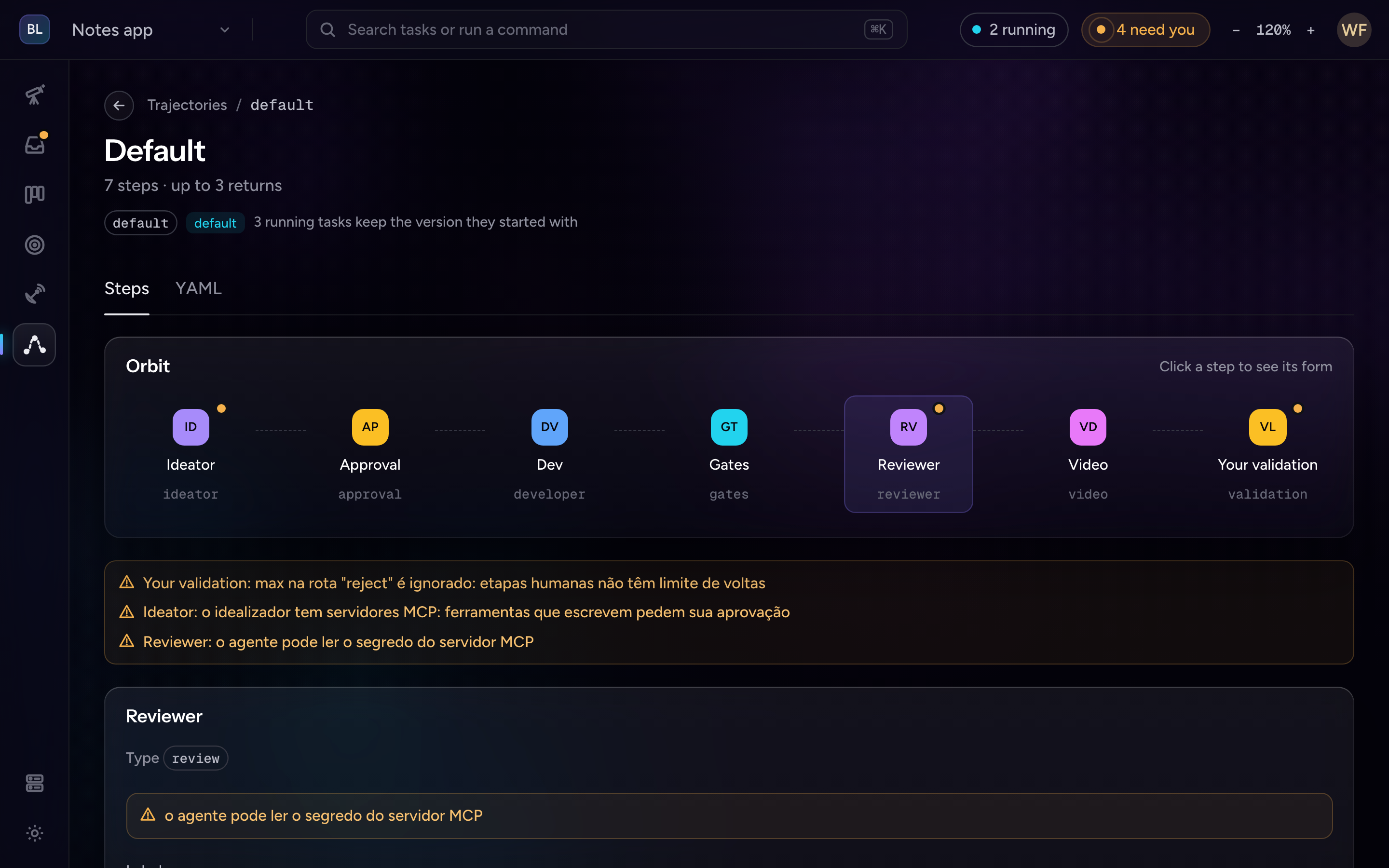
The form shows the step’s type and the fields that apply to it:
- Label, the name shown in the app.
- For agent steps: Executor, Model, Effort, Prompt (with Edit prompt, which opens the prompt in Settings, Instructions), Tools and Permission mode. Picking Free asks you to confirm first. MCP servers lists the servers the step loads, when it has any.
- For an
ideatestep: Can change the repos, thecan_writeswitch. - Routes: where each route goes and its Max returns. Steps where you decide have no max.
Each change is saved when you pick an option or leave the field, and the file is checked before it is written. The YAML tab shows the whole file in an editor with Save, Discard and Versions, for anything the form does not cover. When the file does not load, the Trajectory opens on the YAML tab with the error on its line.
The same edits work from the CLI with the doc command, or by editing the file in your own editor.
Send the work back when something fails
Section titled “Send the work back when something fails”When the gates fail, the task should go back to the developer, not move on to review. You say where it goes with a route. A route names the step to return to, and you set it with one of three keys:
on_fail: <step>is used when acheckstep fails;on_reject: <step>is used when arevieworagentstep rejects;routes: { <name>: <step> }covers any other name. Anapprovalusesadjust; avalidationusesreject(back to the developer) andrethink(back to the ideator).
For example, on_fail: developer on the gates step means a failing test starts a new developer cycle with the failure in the prompt.
Each automatic return counts against max_returns, so a task that keeps failing eventually blocks and asks you for help. The counting rules are on the Tasks page.
Limit one route
Section titled “Limit one route”max_returns counts every automatic return together. To cap a single route, write it as { goto: <step>, max: <n> }:
- id: gates type: check on_fail: { goto: developer, max: 2 }Each route keeps its own count. When the gates send the task back a third time, the task blocks with “The fail route of gates reached its limit of 2 returns”, even if max_returns still had room. A return also still counts against max_returns. Both counts start over when the task goes back to the ideator. A task blocked this way only continues from a restart (retry --restart from the CLI).
max only applies to steps an agent or a command decides. On an approval or validation route it is ignored, and the Trajectory shows a warning saying so.
Add your own Trajectory
Section titled “Add your own Trajectory”Click New trajectory, type a name, and choose where it starts from:
- From the default template: the seven steps of the default flow.
- Duplicate…: a copy of another valid Trajectory of this workspace.
- From scratch: only a developer and a validation, for you to build on.
The name uses lowercase letters, digits and dashes, and starts with a letter. Create opens the new Trajectory, ready to edit. Its label comes from the source, so a copy of the default template is still called “Default” until you change the label: line in the YAML tab.
doc create flow makes the file from the same sources: --template default, --template blank (the default), or --duplicate <name>.
astranize doc create flow quick --template default --workspace notes{"type":"document_saved","kind":"flow","name":"quick","hash":"sha256:a81a664a5d485cbfd255598746e99bcfc215f5ba5060e928a0b563451485605e","validation":{"ok":true,"errors":[],"warnings":[{"line":33,"field":"steps.video","message":"A etapa de vídeo precisa da seção vídeo do config"}]}}You can also write ~/.astranize/workspaces/notes/flows/<name>.yaml by hand.
The file name is the flow name, and the name: key inside the file must be the same. A file whose name: differs is invalid, with the error on the name line.
Choose which Trajectory a task uses
Section titled “Choose which Trajectory a task uses”Every new task gets the workspace’s default Trajectory. That is the flow called default, unless config.yaml names another one with default_flow. Make default on the Trajectories screen writes that key for you:
default_flow: quickThe choice is stored in the task file as flow: quick when the task is created, so changing the default later does not move existing tasks. A probe can create tasks for a named flow, and a handoff step moves a running task to another flow. If default_flow names a flow that does not exist, creating a task fails until you fix it.
Change a Trajectory while tasks run
Section titled “Change a Trajectory while tasks run”When a task starts its first step, Astranize saves a copy of its flow with the task. From then on the task runs on that copy, so you can edit or even break the Trajectory without disturbing work in progress. The Trajectory’s page says how many open tasks keep their own version.
A task picks up your changes only when you restart it: restarting a blocked task (retry --restart from the CLI) takes a fresh copy of the current flow. If the saved copy no longer loads, the task blocks and asks you to restart.
Delete a Trajectory
Section titled “Delete a Trajectory”Delete asks for confirmation and keeps a copy in the workspace history, so a deleted Trajectory can come back: it shows up under Deleted at the bottom of the screen with Restore.
Astranize refuses to delete a Trajectory that is still needed and lists who needs it:
- the
defaultflow, which is the base of the workspace; - the Trajectory named in
default_flow; - one that an open task uses, or that a probe creates tasks for.
From the CLI, doc delete flow <name> gives the same answer:
{"type":"error","message":"in-use: \"quick\" está em uso: Trajetória padrão do workspace, Tag filter","code":"in-use","users":[{"kind":"config","id":"default_flow","label":"Trajetória padrão do workspace"},{"kind":"task","id":"t-0001","label":"Tag filter"}]}Give a step MCP servers
Section titled “Give a step MCP servers”An agent step can use MCP servers, such as a database or an issue tracker. You declare the servers once per workspace in mcp.yaml, then list the ones each step needs under mcp:
servers: notes-db: command: npx args: [-y, "@example/notes-db-mcp"] env: NOTES_DB_TOKEN: vault:notes-db-token - id: developer type: develop mcp: [notes-db]A step without mcp loads no MCP server at all, not even the ones in your own Claude Code settings. Secrets go in the Vault and are referenced with vault:<name>; a ${...} placeholder is refused. Astranize hands them only to the server and hides them in the step’s logs.
A few things to know:
- If the step can run Bash, or runs in Worktree or Free mode, the agent could read the server’s secret. The Trajectory warns “the agent can read the MCP server secret”, and the session repeats it when the step runs.
- An ideator with MCP servers runs in Ask mode: tools that write, including the servers’ own tools, ask for your approval.
- A server that is not in
mcp.yamlis a warning while you edit, and blocks the task when the step runs.
Skip a step when it does not apply
Section titled “Skip a step when it does not apply”Some steps are not worth running for every change. For example, there is no point recording a video when only the README changed. skip_when skips a step when every condition you list holds:
changed_only: [globs]: every changed file matches one of the globs;repos_only: [repos]: the task touches only these repos;triage: [classes]: the triage step picked one of these classes.
approval and validation steps can never be skipped.
Wait for something outside Astranize
Section titled “Wait for something outside Astranize”A wait step pauses the task until something outside Astranize is ready, such as CI. It needs on (what to watch) and outcomes (what each result means):
- id: wait-ci type: wait on: { provider: command, watch: ci, command: "node scripts/ci-status.mjs", every: 60 } outcomes: green: { when: { outcome: green } } red: { when: { outcome: red }, goto: developer, feedback: "CI failed" }The daemon runs the command every every seconds (default 120). The last line of its output is the result: a JSON object becomes the facts, and any other text becomes { outcome: "<text>" }. The first outcome whose when matches ends the wait. With goto, the task jumps to that step; without it, the task moves to the next step.
While it waits, the task has a wait decision with one option per outcome, so you can also resolve it by hand. Only the command provider can be watched today.
Ask before an action runs
Section titled “Ask before an action runs”An action step calls something outside Astranize: a shell command, GitHub, Slack, or a manual step you do yourself. Its mode decides whether it asks you first:
executeruns the action and continues.prepareopens anactiondecision with a preview of what will run, and runs it when you confirm.notifyopens a decision asking you to do it by hand. This is the only mode formanual.
Without mode, a reversible action (like github pr.listMerged) executes and the others prepare. So a command run waits for your confirmation unless you set mode: execute.
Run steps at the same time
Section titled “Run steps at the same time”A parallel step runs its child steps at once, for example two reviewers with different prompts. The first child that does not pass stops the others.
Only review, check, agent (without writes: true) and action steps in execute mode can run inside parallel, and children cannot use skip_when. A child’s route is reached from the group as <child-id>.<route>. A child that needs a decision blocks the group with decision_in_parallel:<child-id>.
Find mistakes in a Trajectory
Section titled “Find mistakes in a Trajectory”Astranize checks the whole file every time it is saved or loaded and lists every problem at once. It sorts them in two kinds:
- Errors make the Trajectory invalid. It is tagged invalid, no new task can use it, and a running task whose flow stops loading blocks with “The task’s flow no longer loads.”
- Warnings do not stop anything. They show under the orbit, and as a dot on the step they belong to.
This flow points on_fail at a step that does not exist and forgets the outcomes of a wait:
version: 2name: badmax_returns: 2steps: - id: build type: develop - id: gates type: check on_fail: developer - id: wait-ci type: wait on: { provider: command, watch: ci, command: "gh run list" }~/.astranize/workspaces/notes/flows/bad.yaml: step "gates": onFail "developer" does not existstep "wait-ci": a wait step needs outcomesSome errors and warnings you may meet:
| Message | Kind | Why |
|---|---|---|
O Codex ainda não está disponível |
error | A step uses executor: codex or fallback_executor: codex. Codex is not available yet, so the whole Trajectory is blocked. |
o nome "quick" não bate com o arquivo: use "fast" |
error | The name: key is not the file name. |
max na rota "reject" é ignorado: etapas humanas não têm limite de voltas |
warning | max on an approval or validation route. |
skills ainda não suportado; a etapa roda sem isso |
warning | skills or context is set; the step runs without it. |
servidor MCP "notes-db" não declarado em mcp.yaml |
warning | The step lists a server that mcp.yaml does not declare. |
A etapa de vídeo precisa da seção vídeo do config |
warning | A video step, but config.yaml has no video section. |
All options
Section titled “All options”Flow files
Section titled “Flow files”| File | Used for |
|---|---|
workspaces/<ws>/flows/default.yaml |
The default flow, when the file exists. |
workspaces/<ws>/workflow.yaml |
The default flow otherwise. This is the older version 1 format; Astranize converts it to the same steps on load. |
workspaces/<ws>/flows/<name>.yaml |
Any other flow. Names use lowercase letters, digits and dashes, start with a letter, and match the name: key. |
workspaces/<ws>/mcp.yaml |
The MCP servers steps can list under mcp. |
init copies workflow.yaml and prompts/ into a new workspace. New Trajectories start from one of two templates: default, the seven steps above, and blank, a developer and a validation.
Top-level keys
Section titled “Top-level keys”| Key | Required | Meaning |
|---|---|---|
version |
yes | Must be 2. 1 is read as a legacy workflow.yaml. |
name |
yes | Same as the file name. |
label |
no | Display name. Defaults to name. |
description |
no | Free text. |
subject |
no | task (default) or mission. See Missions. |
max_returns |
for tasks | How many automatic returns before the task blocks. See Tasks. |
context |
no | Accepted, but not used yet: it only adds a warning. |
hooks |
no | Commands run around the flow: before_run, before_step, after_step, on_blocked, on_done, on_step.<step-id>. Each entry is a command string or { run, required }. |
confirm, limits, repeat |
missions | Mission-only settings. |
steps |
yes | At least one step. |
Step types
Section titled “Step types”| Type | Who acts | What it does |
|---|---|---|
ideate |
agent | Reads the repos and writes the spec, the repos involved, questions for you and the acceptance criteria. Read-only unless can_write: true. |
approval |
you | Stops the task on waiting_you until you approve or request an adjustment. |
develop |
agent | Writes the code in the task worktrees. Each pass is a new cycle. |
check |
command | Runs every gate of every repo in the task. A failure takes the fail route. See Gates. |
review |
agent | Reads the diff and the gate results and approves or rejects each criterion. A rejection takes the reject route. |
summary |
agent | Writes summary.json: what was done, how, points of attention and a test guide. Read-only tools by default. It always ends passed, so it never fails the task. Runs once each time the task reaches the validation. |
video |
agent | Optional add-on. Writes a Playwright spec per video criterion and records it. Needs the video section in config.yaml and an ideate step earlier in the flow. Must come before summary. |
validation |
you | The final review. You approve or reject each criterion, or request changes. It is always the last step, and summary, when present, comes right before it. |
agent |
agent | A generic agent with your prompt. Read-only unless writes: true. It ends passed, rejected (the reject route) or with the name of one of its routes. With input, it receives the output of earlier mission steps. |
action |
external | Calls a provider: command (run), github (pr.listMerged, release.create), slack (message.post) or manual (anything, done by you). |
wait |
external | Puts the task on waiting_others and polls a watcher until an outcome matches. |
triage |
agent | Classifies the task into one of classes (default model haiku). With profiles, each class picks a profile for the next steps. |
handoff |
engine | Moves the task to the first step of the flow named in to, and resets returns. |
parallel |
group | Runs its child steps at the same time. The first child that does not pass stops the others. |
Keys on every step
Section titled “Keys on every step”Every step has an id (lowercase letters, digits and dashes; unique across the flow, including inside parallel groups) and a type. Every step also accepts label, routes, on_fail, on_reject, skip_when and mcp. context and skills are accepted but not used yet; each adds a warning.
can_write: true is valid only on ideate steps. It lets the ideator change the repos and adds the warning “esta etapa pode alterar os repos”.
Keys on agent steps
Section titled “Keys on agent steps”Agent steps (ideate, develop, review, summary, video, agent, triage) also take:
| Key | Meaning |
|---|---|
executor |
The runner that executes the step. claude (Claude Code) is the default and the only one that ships. codex is next and makes the flow invalid for now. |
prompt |
Prompt file, relative to the workspace. Each type has a default (prompts/ideator.md, prompts/developer.md, prompts/reviewer.md, prompts/summary.md, prompts/video.md, prompts/triage.md). |
tools |
Claude tool allow list. Each type has a default. Any entry containing dangerously-skip-permissions is refused. |
model, effort |
Model and effort for the step. See Economy and limits. |
downgrade |
{ model, effort } used instead when your subscription usage passes the downgrade threshold. Never applied to review. |
max_attempts |
Retries after a reply that breaks the step contract. Default 2. |
permissions |
ask, worktree or free. See Permission modes. |
fallback_executor |
Executor to switch to when the first one is over its usage limit. codex makes the flow invalid for now. |
contract |
JSON Schema file for an agent step’s output. |
subagents |
Lets the agent start subagents. On by default for develop only. |
Setting an agent key on a non-agent step is an error such as step "gates": model is only valid on agent steps.
Route keys
Section titled “Route keys”A route is a step id, or { goto: <step>, max: <n> }. Targets must be top-level step ids, or loading fails with step "<id>": on_fail "<target>" does not exist. max is enforced on its own count, and ignored on approval and validation routes.
If an approval step has no adjust route, a change request goes to the nearest agent step before it. If a step returns on a route it does not have, the task blocks.
Good to know
Section titled “Good to know”- Keys are snake_case. camelCase still loads with one warning per file; using both forms of the same key is an error.
- Steps do not depend on which agent runs them. Today only the Claude Code runner ships. Codex is next: a flow that uses it anywhere is invalid for now.
- Order rule:
videobeforesummary, andsummaryright beforevalidation. Avideoaftersummaryis an error. - The empty Trajectories screen lists examples as plain text. A gallery of ready-made Trajectories to import is not there yet; the templates are
defaultandblank.
Next steps
Section titled “Next steps”- Build a Trajectory: make your own, step by step
- Edit instructions: the prompts each step reads
- Gates: what a
checkstep runs - YAML keys