
Queue and capacity
Astranize puts every task in a queue and starts it only when your machine has room, so approving ten tasks never starts ten agents at once.
You can approve as many tasks as you like. Astranize does not start them all at once: it puts each one in a queue and starts it only when your machine has room. Ten approvals do not open ten agents and freeze your laptop. They wait their turn, and the queue tells you why each one is waiting.
The queue belongs to the daemon, a small background process on your machine that runs every job. You rarely deal with it directly: the CLI starts it when needed, and the desktop app shows its state in the top bar.
See the queue
Section titled “See the queue”Run queue to see what is running, what is waiting and why. Here the queue was paused before a task was sent to the ideator:
astranize queue pause --workspace notesastranize queue limit 2 --workspace notesastranize ideate t-0002 --workspace notesastranize queue --workspace notes{"type":"queued","taskId":"t-0002","position":1}{"type":"queue","queue":{"paused":true,"maxRunning":2,"memoryFloorBytes":2147483648,"running":[],"queued":[{"workspace":"notes","taskId":"t-0002","command":"ideate","position":1,"reason":"Queue paused","reasonKind":"paused","enqueuedAt":"2026-11-20T02:37:13.703Z"}],"room":2,"machine":{"memoryAvailableBytes":5506727936,"memoryTotalBytes":34359738368,"cpuLoad":4.24,"dockerMemoryBytes":3915559993},"pendingUpdate":false}}t-0002 is first in line and waits with the reason “Queue paused”. maxRunning is 2, and room says two more developer-sized jobs would fit in memory right now. Run queue resume and it starts.
In the desktop app, the capacity meter in the top bar opens Capacity and queue with the same information.
Who goes first
Section titled “Who goes first”The queue is first in, first out, with one exception: a task coming back from you goes ahead of new work. When you answer a decision, validate or retry, the task does not wait behind tasks that have not started yet.
When the job at the front cannot start because memory is short or the running limit is reached, every job behind it waits too, with a reason like “Waiting for t-0001, which is ahead in the queue”. That keeps a big task from being skipped forever by a stream of small ones.
What makes a job wait
Section titled “What makes a job wait”Before starting a job, the daemon checks several things in order. The first one that fails is the reason you see in the queue:
- A daemon update is pending.
- You paused the queue.
- Your Claude subscription is close to its limit.
- Another task holds a fixed port this task needs.
- The running limit is reached.
- A shared resource the step needs, such as the video recorder, is busy.
- Starting would leave too little free memory.
- A job ahead of it is waiting for memory or the limit.
The daemon checks the queue every 5 seconds and whenever something changes. The next sections explain each check.
Keep memory free
Section titled “Keep memory free”The daemon reads free memory from your system and always keeps some of it free. That reserve is called the memory floor, set with memory_floor_gb in ~/.astranize/settings.yaml, 2 GB by default. A job starts when:
available memory - memory reserved by jobs just started - job estimate >= floorThe estimate is how much memory this kind of step used before. Astranize measures every step, and uses the largest of the last 5 measurements for that step type and set of repos. Before there are any measurements, it assumes 0.5 GB for ideate and review, 1.5 GB for develop and check, 3 GB for video, and 1.5 GB for anything else.
A job that just started reserves its estimate for 60 seconds, until its real usage shows up in the reading. room in the queue state is how many more developer-sized jobs (1.5 GB) fit right now.
Limit how many tasks run at once
Section titled “Limit how many tasks run at once”Memory alone may let many tasks run together. If you want fewer, set a running limit with queue limit:
astranize queue limit 2 --workspace notesNow at most 2 tasks run at the same time, and the memory check still applies. queue limit off removes the limit, and the app shows “No limit: the machine decides”.
Share one resource between tasks
Section titled “Share one resource between tasks”Some steps need something only one task can use at a time. That is called a slot. The video step needs the video slot, which covers the whole machine: by default only one task records a video at a time (video_slots in settings.yaml).
A workspace can declare its own slots in config.yaml, for example a shared test database:
slots: test-db: 1A video step takes the video slot plus every slot of its workspace. A task waiting for a slot shows which slot and who holds it, for example “Waiting for the video slot (t-0003 is recording)”.
When a task starts services, such as a dev server for the proof video, it gets its own ports. Every {ports.<name>} placeholder in config.yaml (gates, service commands, health URLs, video.base_url) receives a free port for each task. The port is saved in runs/<task>/services/ports.json and reused on later cycles. Two tasks can then run the same app side by side.
A service whose health or url has a fixed port written in it (http://localhost:5173) can only run once at a time. The daemon holds the second task with reason port until the first one ends.
Subscription limits
Section titled “Subscription limits”Astranize reads your Claude subscription usage after every agent run: the 5 hour window and the weekly window. Before starting a step, it compares that usage with two thresholds:
- At
downgrade_at, steps that have adowngraderun on the cheaper model. - At
queue_limit, the job waits with reasonprovideruntil the window resets.
If the step has a fallback_executor that is still under its limit, the step switches to it instead of waiting. A waiting job shows a message like “Claude limit: 91% of the 5-hour window, 10% kept in reserve. Resumes when it resets, Thu 14:00”. To change the thresholds, see Economy and limits.
How you use it
Section titled “How you use it”Click the running counter in the top bar (for example, “3 running”) to open Capacity and queue. From top to bottom it shows:
- free memory, CPU load, the memory floor and how much Docker uses;
- Running, with each task that holds a slot;
- Queue, with each waiting job, its place in line and the reason it waits;
- the limit (“At most 3 at a time”), with Lower the limit, Raise the limit and Remove the limit;
- Pause the queue, which turns into Resume the queue while paused.
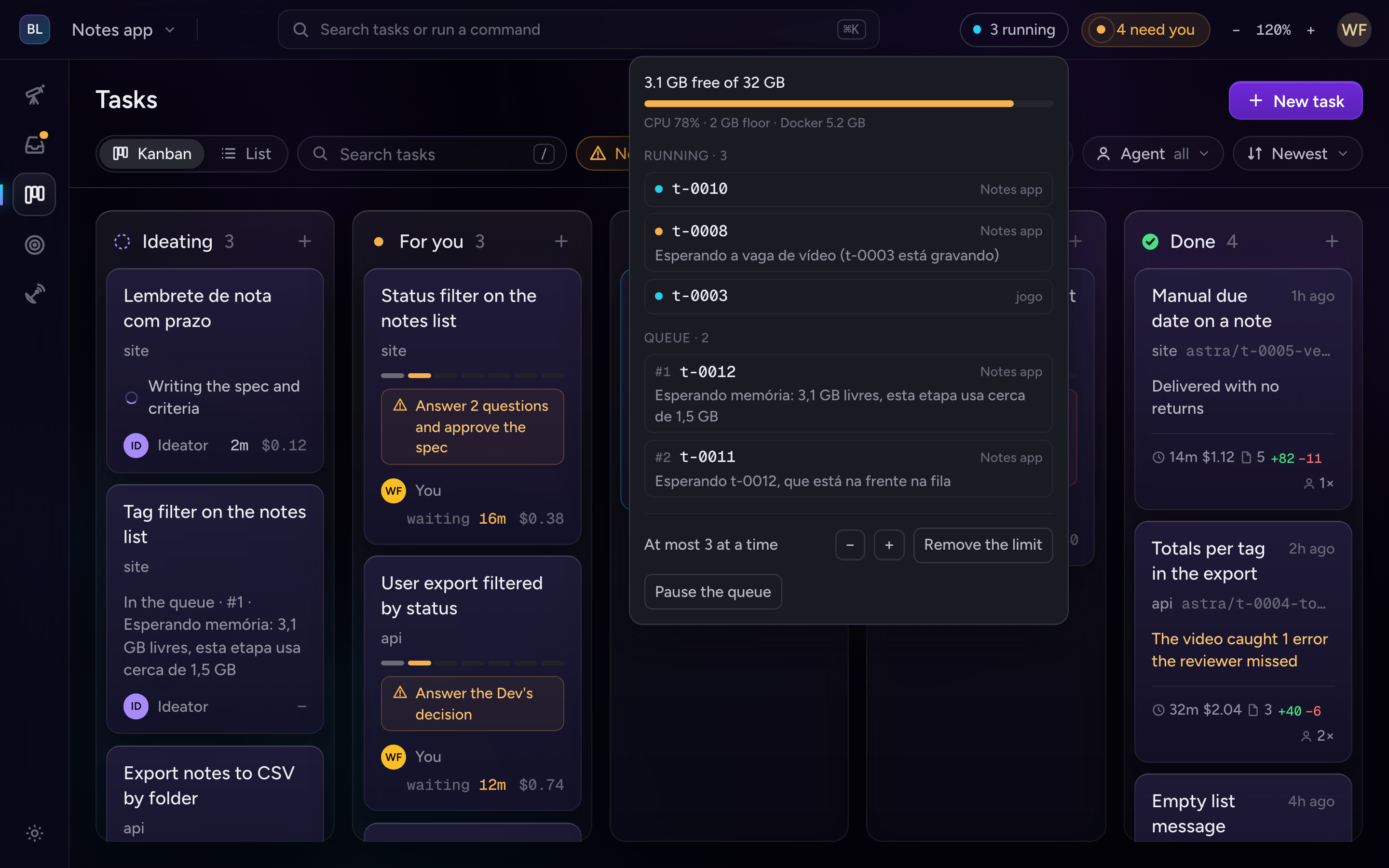
When a daemon update is waiting for running tasks to finish, the popover also offers Restart now. To stop every running and queued job, use Stop everything in the system tray menu.
astranize queue --workspace notes # show the stateastranize queue pause --workspace notes # running jobs go on, nothing new startsastranize queue resume --workspace notesastranize queue limit 2 --workspace notes # at most 2 tasks at a timeastranize queue limit off --workspace notes # remove the limitastranize queue stop-all --workspace notes # stop every running and queued jobastranize queue restart-now --workspace notes # restart the daemon nowThe CLI asks for --workspace, but there is one queue for the whole machine: it covers every workspace. pause and limit are saved, so they survive a restart.
All options
Section titled “All options”Wait reasons
Section titled “Wait reasons”| Reason | Holds a job when |
|---|---|
update |
A daemon update is pending. |
paused |
You paused the queue. |
provider |
The agent for the next step is over its subscription limit. |
port |
Another running task holds a fixed port this task’s services need. |
limit |
max_running tasks are already running. |
slot |
A slot the step needs is full (the video slot or a workspace slot). |
memory |
Starting it would leave less free memory than the floor. |
behind |
A job ahead of it is held by memory or the limit. |
Subscription thresholds
Section titled “Subscription thresholds”| Threshold | Default 5 h | Default weekly | Effect |
|---|---|---|---|
downgrade_at |
75% | 70% | Steps with a downgrade run on the cheaper model. |
queue_limit |
90% | 85% | The job is held with reason provider until the window resets. |
| File | Content |
|---|---|
~/.astranize/daemon.json |
Port, token and pid (mode 0600). |
~/.astranize/queue.json |
The paused flag and the queued jobs. It survives restarts. |
~/.astranize/settings.yaml |
Machine settings: memory_floor_gb, max_running, video_slots. |
~/.astranize/limits.json |
The last subscription usage read from agent runs. |
~/.astranize/daemon.log |
Crashes of the daemon process. |
workspaces/<ws>/footprints.json |
Memory measured per step type and repo set. |
After queue limit 2 and queue pause, the two files look like this:
max_running: 2{ "paused": true, "jobs": [...]}Good to know
Section titled “Good to know”The daemon
Section titled “The daemon”Commands that change something (create, ideate, approve, adjust, run, validate, stop, decide, retry, archive) send the request to the daemon over HTTP on 127.0.0.1, with a token. If the daemon is not running, the CLI starts it. Each job in the queue is either an ideate or a run.
To shut the daemon down:
astranize daemon stop{"type":"daemon","status":"stopping","pid":48121}When a newer CLI talks to an older daemon, the daemon stops starting new work (pendingUpdate: true), lets running jobs finish, and restarts on the new version. queue restart-now restarts it at once.
Limit values
Section titled “Limit values”queue limit takes a whole number of 1 or more, or off. Anything else fails with queue limit takes a whole number of tasks (1 or more) or "off".
Next steps
Section titled “Next steps”- Tasks: the
queuedstatus - Economy and limits: models, thresholds and budgets
- Proof video: services and ports in practice
- CLI reference