
Economy and limits
How Astranize spends your Claude subscription carefully, with the right model for each step, a cheaper model near your limits and a budget per task.
Astranize spends your Claude subscription on your behalf, so it tries to spend it well. Each step gets a model sized to its job. When you get close to your subscription limit, some steps switch to a cheaper model. When a step runs again, it does not redo work it already did. And every task has a budget, so a task that goes wrong asks you before it spends too much.
This page explains each of those, and how to change them.
See which model each step uses
Section titled “See which model each step uses”Run step-defaults to see what each agent step of a task would use right now:
astranize step-defaults t-0002 --workspace notes{"type":"step_defaults","taskId":"t-0002","steps":{"ideator":{"executor":"claude","model":null,"effort":null},"developer":{"executor":"claude","model":"sonnet","effort":null},"reviewer":{"executor":"claude","model":"opus","effort":null}}}The developer uses sonnet, the reviewer opus, and the ideator has no model set, so it runs on the claude CLI default. Those values come from the default flow.
How the model is chosen
Section titled “How the model is chosen”A step’s model and effort come from up to four layers. Each layer overrides the one before it:
- The step’s
modelandeffortin the flow. The default flow usessonnetfor the developer andopusfor the reviewer, and leaves the ideator on the CLI default. The summary step runs onsonnetwith low effort. - The active profile, which overrides model and effort for the step types it lists.
- The step’s
downgrade, when your usage is past the downgrade threshold. - A one-round override you send with a mid-run instruction (
instruct --model <m> --effort <e>). It lasts for that round of the step only.
Models are fable, opus, sonnet and haiku. Efforts are low, medium, high, xhigh and max.
Every run reports what it used in its step_agent event: model, effort, downgraded, overridden and switchedFrom.
Use a cheaper model near your limit
Section titled “Use a cheaper model near your limit”Claude subscriptions have a 5 hour window and a weekly window. When usage in either one passes downgrade_at (75% and 70% by default), steps that declare a downgrade switch to it. The default flow downgrades the ideator to { model: sonnet, effort: low }:
{"type":"step_agent","taskId":"t-0004","step":"ideator","cycle":0,"note":{"executor":"claude","model":"sonnet","effort":"low","downgraded":true,"overridden":false,"switchedFrom":null,"permissionMode":"ask"}}The reviewer is never downgraded, even if you give it a downgrade. A weaker review sends more work back to the developer than it saves.
Past queue_limit (90% and 85%), new steps on that provider do not start at all; running steps finish. See Queue and capacity.
Profiles
Section titled “Profiles”A profile is a named set of model choices per step type. You switch the whole workspace, or one task, to a profile instead of editing the flow. Three are built in:
| Name | Label | ideate | develop | review |
|---|---|---|---|---|
economico |
Econômico | sonnet, low | sonnet, low | opus |
padrao |
Padrão | flow values | flow values | flow values |
maximo |
Máximo | opus, high | opus, high | opus, high |
For example, to make the whole workspace cheaper:
astranize policies set --workspace notes --patch '{"workspace":{"profile":"economico"}}'A task uses the first profile set among: the task’s own profile (in its task file), the profile picked by a triage step, and the workspace profile (padrao by default).
You can add your own profiles under profiles in ~/.astranize/settings.yaml:
profiles: quick: label: Quick steps: develop: { model: haiku, effort: low } review: { model: sonnet }Do not redo work when a step runs again
Section titled “Do not redo work when a step runs again”When the gates fail or the reviewer asks for changes, the developer runs again. Two things keep that second pass cheap.
The developer picks up its previous session. If it runs again within an hour on the same task, and the spec and criteria have not changed, Astranize resumes the previous Claude session and sends only what is new: the gate failure, the review requests, your answers or instructions. The agent keeps the context it already built instead of reading the repo again. Usage records mark these runs with resumed: true.
The reviewer reads only the new diff. After a review, Astranize records the reviewed commit of each repo. On the next review, the reviewer gets a summary of the whole change against the base branch, plus the full diff of only what changed since that commit. If that commit is no longer in the branch history, it gets the full diff instead.
Budgets
Section titled “Budgets”A budget caps what a task, or one step of it, may spend before asking you. By default a task may spend US$ 6 and the developer step US$ 3.
Before each agent run, Astranize adds up what the task (and the step) already spent and tells Claude how much is left. When the tightest budget runs out, the step pauses with a decision such as “The task went over its budget (US$ 6.12 of 6.00)”:
continue(recommended) runs the step again with more budget: the step budget if one is set, otherwise half the task budget. The changes so far stay in the worktree.stopblocks the task with reasonbudget_stopped. You can retry it later.
To raise the task budget to US$ 10:
astranize policies set --workspace notes --patch '{"budgets":{"task":{"claude":{"usd":10}}}}'Check your usage
Section titled “Check your usage”limits prints the latest subscription readings, taken after every Claude run:
astranize limits --workspace notes{"type":"limits","providers":{"claude":{"provider":"claude","readAt":"2026-11-20T02:47:48.451Z","fiveHour":{"usedPct":78,"resetsAt":"2026-11-20T06:00:00.000Z"},"weekly":{"usedPct":41,"resetsAt":"2026-11-24T09:00:00.000Z"}}}}usage adds up cost and tokens across every workspace on the machine for a period: today, 7d (the default), 30d or all:
astranize usage --workspace notes --period 7d{"type":"usage","period":"7d","generatedAt":"2026-11-22T04:56:46.674Z","totals":{"costUsd":0.42,"tokens":20600,"cacheRead":91000,"cacheWrite":12000,"cacheTokens":103000,"runs":1},"byProvider":[{"provider":"claude","costUsd":0.42,"tokens":20600,"cacheRead":91000,"cacheWrite":12000,"cacheTokens":103000,"runs":1}],"byStep":[{"step":"ideator","costUsd":0.42,"tokens":20600,"cacheRead":91000,"cacheWrite":12000,"cacheTokens":103000,"runs":1}],"byWorkspace":[{"workspace":"notes","costUsd":0.42,"tokens":20600,"cacheRead":91000,"cacheWrite":12000,"cacheTokens":103000,"runs":1,"estimatedWeekPct":{"claude":41}}],"weeks":[]}tokens counts fresh tokens, input and output; the cache read and written is kept apart in cacheRead, cacheWrite and cacheTokens. weeks adds, for each week, tasks done, tokens per task done (fresh, cache read, cache write), runs and average cycles.
How you use it
Section titled “How you use it”Open Settings at the bottom of the left rail. Limits and reserve has one block per provider, Claude and Codex, with the 5-hour window and the week side by side. For each window you set Pause at and Downgrade from, in percent. Under Pause at, the app tells you how much you keep for yourself: pausing at 85% is the same as keeping 15%.
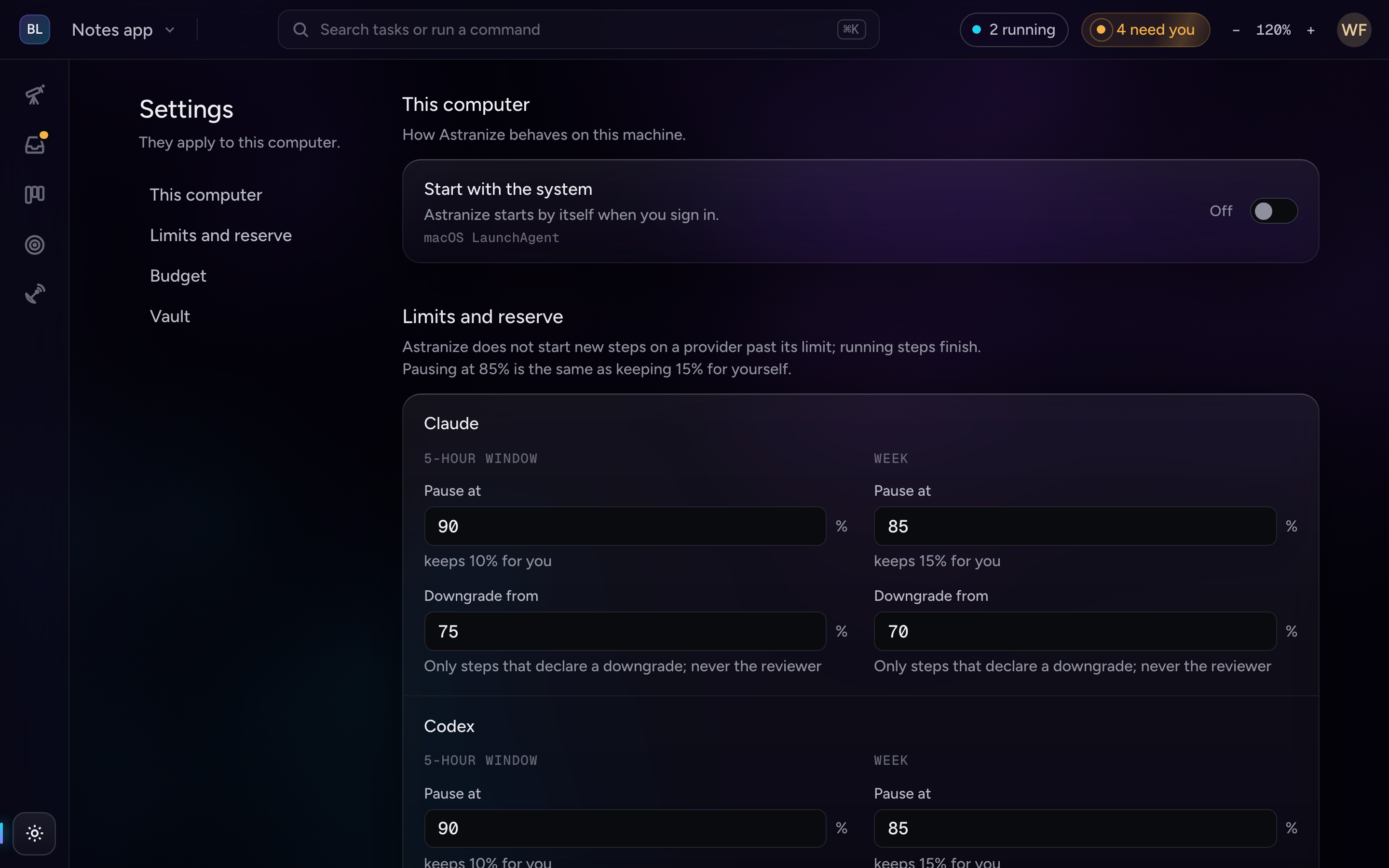
Budget, in the same screen, sets how much a task may spend before it asks you: Per task and In the dev, in US$ for Claude and in tokens for Codex. A value is saved when you leave the field.
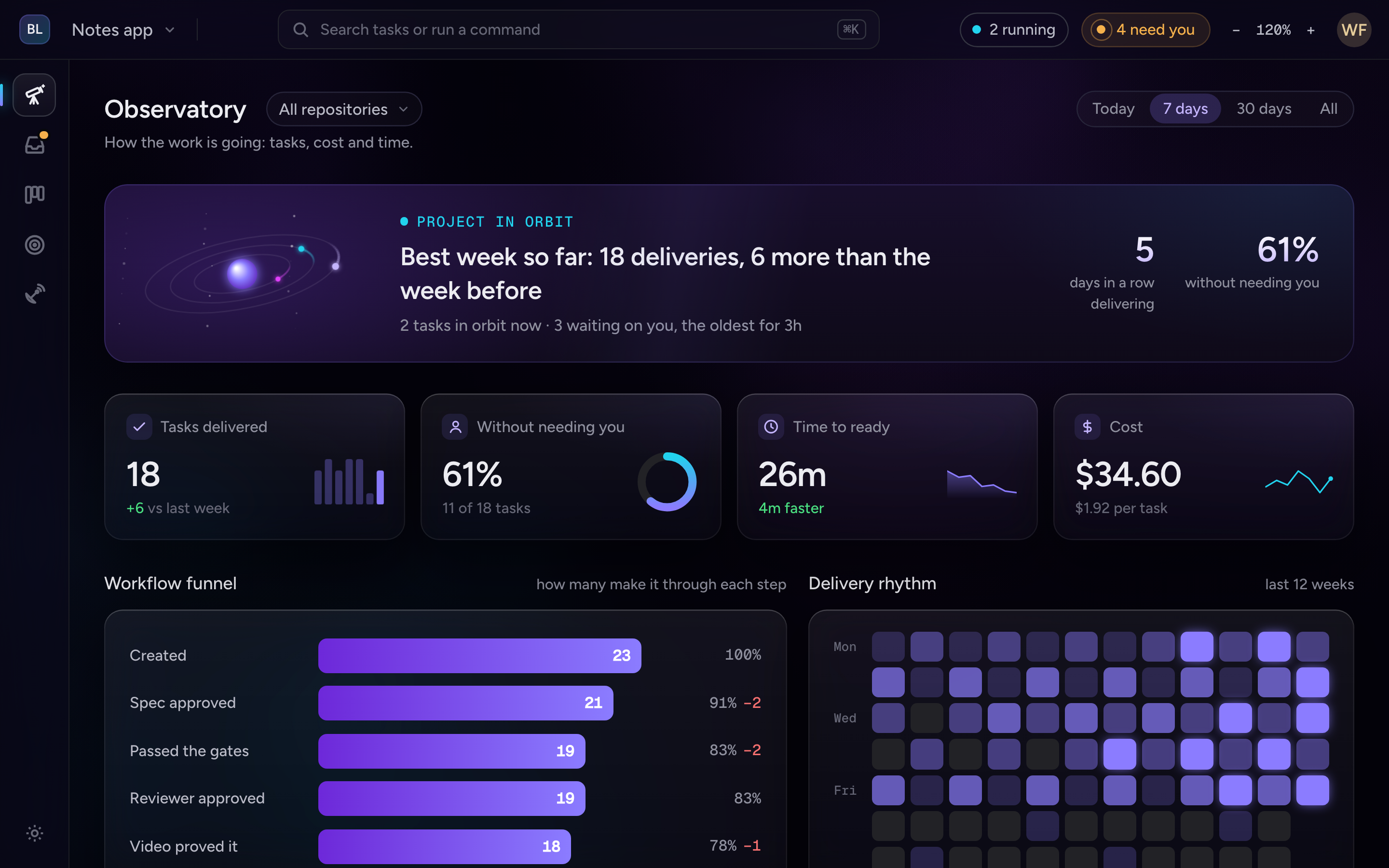
To see where the money goes, open the Observatory, the first icon on the left rail. Pick a period (Today, 7 days, 30 days or All) and a repository. The top cards show tasks delivered and cost, and the Subscription usage section further down shows your Claude and Codex windows, spend by provider, by step and by workspace, and tokens per finished task.
Inside a task, the session view shows cost by step and marks the steps that ran on a downgraded model. Switching profiles is CLI only for now.
Below Subscription usage, the Observatory’s Telemetry section shows how your agents work across tasks, such as how much they read before editing. It is covered in Telemetry.
policies shows the thresholds, budgets, profiles and workspace settings in effect. policies set changes them with a JSON patch:
astranize policies --workspace notesastranize policies set --workspace notes --patch '{"providers":{"claude":{"downgradeAt":{"fiveHour":80}}}}'astranize policies set --workspace notes --patch '{"budgets":{"task":{"claude":{"usd":10}}}}'astranize policies set --workspace notes --patch '{"workspace":{"profile":"economico"}}'{"type":"policies","providers":{"claude":{"queueLimit":{"fiveHour":90,"weekly":85},"downgradeAt":{"fiveHour":75,"weekly":70}},"codex":{...}},"budgets":{"task":{"claude":{"usd":6},"codex":{"tokens":2000000}},"steps":{"developer":{"claude":{"usd":3},"codex":{"tokens":1000000}}}},"profiles":[...],"workspace":{"profile":"padrao","permissionMode":"ask"},...}All options
Section titled “All options”Thresholds
Section titled “Thresholds”| Threshold | Default 5 h | Default weekly | Effect |
|---|---|---|---|
downgrade_at |
75% | 70% | Steps with a downgrade run on the cheaper model. |
queue_limit |
90% | 85% | New steps on that provider wait until the window resets. |
Budgets
Section titled “Budgets”| Scope | Claude default | Codex default |
|---|---|---|
| Per task | US$ 6 | 2,000,000 tokens |
Per step developer |
US$ 3 | 1,000,000 tokens |
Budgets live in ~/.astranize/settings.yaml under budgets.task and budgets.steps.<step-id>. A workspace can override them in its config.yaml under policies.budgets.
Where usage is recorded
Section titled “Where usage is recorded”| File | Content |
|---|---|
runs/<task>/usage.jsonl |
One line per agent run: workspace, task, step, cycle, attempt, provider, model, effort, tokens (input, output, cache read, cache write), costUsd, duration, turns, downgraded, resumed, sessionId. |
runs/<task>/sessions.json |
The Claude sessions the developer can resume. |
runs/<task>/cycle-N/reviewed.json |
The commit the reviewer reviewed, per repo. |
~/.astranize/limits.json |
The latest 5 hour and weekly readings per provider, with usedPct, resetsAt and readAt. Updated after every Claude run. |
{"at":"2026-11-20T02:47:48.441Z","workspace":"notes","taskId":"t-0003","provider":"claude","model":"claude-sonnet-4-5","effort":null,"step":"ideator","cycle":0,"attempt":1,"inputTokens":18200,"outputTokens":2400,"cacheReadTokens":91000,"cacheWriteTokens":12000,"costUsd":0.42,"durationMs":61000,"turns":9,"downgraded":false,"resumed":false,"sessionId":"sess-1"}Good to know
Section titled “Good to know”- The remaining budget is passed to Claude as
--max-budget-usd. - A resumed session uses Claude’s
--resume. - Thresholds must be between 0 and 100, or
policies setfails withLimits must be between 0 and 100. - A profile that does not exist fails with
Unknown profile "<name>". - A
usageperiod other than the four above fails withUnknown period "<value>".
Next steps
Section titled “Next steps”- Queue and capacity: what happens past
queue_limit - Flows:
model,effort,downgrade,fallback_executor - Mid-run instructions: the one-round model override
- Decisions: the budget decision
- Telemetry: signals, triggers and baselines in the Observatory