
Build a Trajectory
Make your own list of steps for a task in the app, choose the model and permissions for each one, and fine-tune it in YAML.
Every task in Astranize walks through a list of steps: an agent writes a spec, you approve it, another agent writes the code, your checks run, and so on. The app calls that list a Trajectory; on disk it is a flow, a short YAML file. The default one fits most code changes, but you can make your own: drop the steps you do not need, add new ones, and pick a model and permission mode for each agent.
This guide builds one in the app first, then shows the YAML behind it for the things the form does not cover. If you want the ideas behind Trajectories first, read Trajectories.
Create the Trajectory
Section titled “Create the Trajectory”- Open Trajectories in the sidebar and click New trajectory.
- Type
quickas the Name. Names use lowercase letters, digits and dashes, and start with a letter. - Under Start from, pick From the default template to get the seven default steps, or From scratch for just a developer and a validation. Duplicate… copies another Trajectory of the workspace.
- Click Create. The new Trajectory opens on its Steps tab.
astranize doc create flow quick --template default --workspace notes--template blank starts from scratch and --duplicate <name> copies another flow. The doc command page has every option.
The Steps tab draws the Trajectory as an orbit, one node per step. Click a node to open its form:
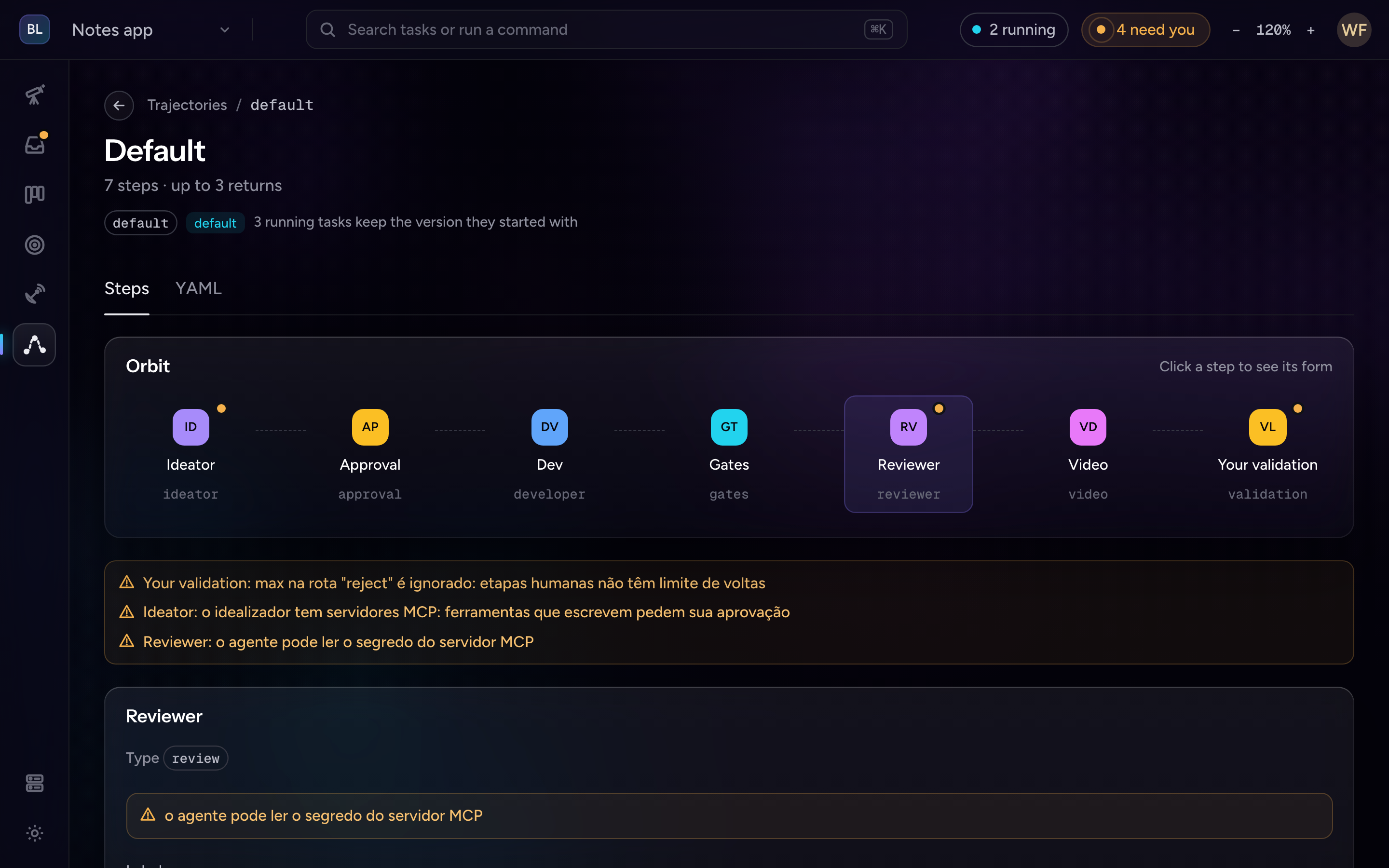
Each field is saved as soon as you pick an option or leave it, and the file is checked first: a change that would break the Trajectory is refused with the reason next to the field. Anything the form does not show, such as downgrade or skip_when, you edit in the YAML tab, which has Save, Discard and Versions. The rest of this guide shows both.
Where flows live
Section titled “Where flows live”Flows are YAML files in the workspace’s flows/ folder. The app creates the folder the first time you create a Trajectory.
Directory~/.astranize/workspaces/notes/
- config.yaml
- workflow.yaml the old version 1 file, used only when flows/default.yaml is missing
Directoryflows/
- default.yaml the workspace default
- quick.yaml
- preview.yaml
- chapter.yaml
Directoryprompts/
- …
New tasks use the workspace default: flows/default.yaml, or the flow config.yaml names in default_flow. Any other file, such as flows/quick.yaml, is a named flow. The file name must match the name: key inside it, or the flow is invalid, and use lowercase letters, digits and dashes.
Write your first flow
Section titled “Write your first flow”Here is the smallest flow that does something useful, as it looks in the YAML tab: an agent writes the spec, you approve it, an agent writes the code, and you check the result.
version: 2name: quicklabel: Quick fixsubject: taskmax_returns: 2steps: - id: ideator type: ideate - id: approval type: approval - id: developer type: develop - id: validation type: validationEach step has an id you choose and a type that says what it does. ideate, develop and the other built-in types come with a default prompt (prompts/ideator.md, prompts/developer.md) and a default tool list, so you do not have to write either. max_returns limits how many times the task can be sent back before it blocks; you will see it at work in a moment.
Point tasks at your Trajectory
Section titled “Point tasks at your Trajectory”The simplest way is to make it the workspace default. Every task created from then on uses it, in the app and from create:
On the Trajectories screen, click Make default on the quick row. The default tag moves to it.
Set default_flow in config.yaml, by hand or with doc save config (see the doc command):
default_flow: quickTasks that already exist keep the flow they were created with. To move a single task instead, there is no button or CLI flag: set flow: in its task file before it starts.
-
Create a task.
Terminal window astranize create --workspace notes --title "Fix typo" --description "Fix the typo on the empty state." -
Open
~/.astranize/workspaces/notes/tasks/t-0002.mdand setflow: quickin the front matter, next totitle. -
Ask which model each agent step will use. This also proves the flow loads.
Terminal window astranize step-defaults t-0002 --workspace notes{"type":"step_defaults","taskId":"t-0002","steps":{"ideator":{"executor":"claude","model":null,"effort":null},"developer":{"executor":"claude","model":null,"effort":null}},"at":"2026-11-20T03:29:55.344Z"}
model is null because the flow does not ask for one yet, so the agent CLI uses its own default. A name with no matching file fails clearly:
{"type":"error","message":"flow \"nope\" does not exist (~/.astranize/workspaces/notes/flows/nope.yaml)"}Send the task back when a check fails
Section titled “Send the task back when a check fails”A flow without a check step does not run your tests. Add a check step after the developer: it runs the gates from config.yaml.
When a gate fails, the task should go back to the developer with the error. That jump back is called a route, and on a check step you set it with on_fail:
- id: gates type: check on_fail: developerEach time an automated step like this one sends the task back, it counts toward max_returns. With max_returns: 2, a third return blocks the task instead of looping forever. Your own decisions, such as rejecting a video, do not count.
In the app, a step’s routes are in the Routes part of its form: Goes to picks the destination and Max returns caps that one route (see Limit one route). A new route or a new step is added in the YAML tab.
A route must point at a step id that exists. A typo fails when the flow loads:
{"type":"error","message":"~/.astranize/workspaces/notes/flows/quick.yaml: step \"gates\": onFail \"dev\" does not exist"}Add a reviewer
Section titled “Add a reviewer”A review step has an agent read the diff against each acceptance criterion. When it rejects the change, on_reject says where the task goes:
- id: reviewer type: review on_reject: developerThe steps where you decide have routes too. On approval, adjust is where the task goes when you ask for changes to the spec. On validation, reject sends it back to the developer and rethink back to the ideator:
- id: approval type: approval routes: { adjust: ideator } - id: validation type: validation routes: { reject: developer, rethink: ideator }Choose a model for each step
Section titled “Choose a model for each step”Each agent step can ask for a model (fable, opus, sonnet or haiku) and an effort (low to max). A cheap model is fine for a spec; a stronger one pays off in review. In the app, pick them in the step’s Model and Effort fields; CLI default and Model default leave the key out.
When your usage gets close to a provider’s limit, Astranize can switch a step to a cheaper setting so work keeps moving. That fallback is called a downgrade, and you set it with downgrade in the YAML tab:
- id: developer type: develop model: sonnet effort: medium downgrade: { model: haiku, effort: low }Review steps are never downgraded. A model change you send with a mid-run instruction wins over the downgrade for that round. Economy and limits explains the thresholds.
Let the developer edit without asking
Section titled “Let the developer edit without asking”By default an agent may only use the tools in its allowlist, and anything else is denied. For a quick fix you may want the developer to edit freely inside the task’s own worktree. That is the worktree permission mode:
permissions: worktreeIn the app, that is Permission mode in the step form; From the workspace or the task leaves the key out, and Free asks you to confirm first. There are three modes: ask, worktree and free. A flow file can never turn on free by itself; a step only gets it when the workspace is already in Free mode. The All options table below lists exactly what each mode does.
The finished quick flow
Section titled “The finished quick flow”Put the pieces together, and add a description for the app:
version: 2name: quicklabel: Quick fixdescription: Small changes. A cheaper reviewer and one human check at the end.subject: taskmax_returns: 2steps: - id: ideator type: ideate model: sonnet effort: low - id: approval type: approval routes: { adjust: ideator } - id: developer type: develop model: sonnet effort: medium downgrade: { model: haiku, effort: low } permissions: worktree - id: gates type: check on_fail: developer - id: reviewer type: review model: sonnet effort: high on_reject: developer - id: validation type: validation routes: { reject: developer, rethink: ideator }Run step-defaults again and the models show up:
{"type":"step_defaults","taskId":"t-0002","steps":{"ideator":{"executor":"claude","model":"sonnet","effort":"low"},"developer":{"executor":"claude","model":"sonnet","effort":"medium"},"reviewer":{"executor":"claude","model":"sonnet","effort":"high"}},"at":"2026-11-20T02:36:34.684Z"}Skip a step for some changes
Section titled “Skip a step for some changes”Sometimes a step is pointless for a change, such as recording a video, if you added the optional video step, when only Markdown files changed. skip_when skips a step when every condition you list holds:
- id: video type: video skip_when: { changed_only: ['**/*.md'] }The conditions are changed_only (every changed file matches these globs), repos_only (the task touches only these repos) and triage (the task’s triage class is one of these). approval and validation cannot be skipped.
Add an agent, an action and a wait
Section titled “Add an agent, an action and a wait”The built-in types cover the usual code loop. Three generic types let you add anything else:
- An
agentstep runs your own prompt and answers with an outcome. - An
actionstep runs or prepares one action, such as a command or a Slack message. - A
waitstep pauses the task until something outside reports back.
This flow uses all three after the gates: an agent writes a changelog entry, an action deploys a preview, and a wait polls until the preview is live.
version: 2name: previewlabel: Ship to previewsubject: taskmax_returns: 3steps: - id: ideator type: ideate - id: approval type: approval routes: { adjust: ideator } - id: developer type: develop model: sonnet - id: gates type: check on_fail: developer - id: changelog type: agent label: Changelog entry prompt: prompts/changelog.md writes: true model: haiku effort: low routes: { redo: developer } - id: deploy-preview type: action label: Deploy a preview action: provider: command do: run repo: web command: "npm run deploy:preview -- --name {taskId}" timeout_seconds: 900 mode: execute - id: preview-ready type: wait label: Preview is live on: provider: command watch: poll every: 60 command: "node {workspaceDir}/scripts/preview-status.mjs {taskId}" outcomes: ready: when: { state: ready } broken: when: { state: [failed, crashed] } goto: developer feedback: The preview deploy failed. Read the deploy log and fix the build. - id: validation type: validation routes: { reject: developer, rethink: ideator }The agent step
Section titled “The agent step”changelog runs prompts/changelog.md with the task. writes: true lets it edit files. It ends its answer with a JSON block whose outcome is passed, rejected or one of its route names, here redo.
passed moves on, and redo sends the task to the developer. rejected with no reject route blocks the task. The agent can also ask you a question with needsDecision. A reply that breaks this contract is retried up to max_attempts times.
The action step
Section titled “The action step”deploy-preview names a provider and what to do; the other keys are that provider’s parameters. The command provider runs a shell command, here in the web worktree.
mode: execute runs it right away. With mode: prepare, Astranize opens a decision in For you so you can approve, edit or skip it first. When you leave mode out, reversible actions run and the others are prepared.
The wait step
Section titled “The wait step”preview-ready pauses the task and runs the status command every 60 seconds. The command prints one line. A JSON object gives facts that each outcome’s when matches; a plain word is taken as the outcome name.
{"state":"ready","url":"https://preview.example.test/t-0007"}ready has no goto, so the task moves to the next step. broken sends it back to the developer with the feedback text. The wait also shows up in For you with one option per outcome, so you can resolve it by hand.
Build a flow that is not about code
Section titled “Build a flow that is not about code”Nothing in a flow assumes code. Here the repo is a git folder with a book manuscript (repos: { book: { path: ~/writing/book, base_branch: main } } in config.yaml), and the flow plans, drafts and reviews one chapter.
version: 2name: chapterlabel: Book chapterdescription: Plan a chapter, draft it, run two read-only reviews in parallel, then you sign it off.subject: taskmax_returns: 3steps: - id: outline type: ideate label: Outline prompt: prompts/chapter-outline.md model: opus - id: approval type: approval routes: { adjust: outline } - id: draft type: agent label: Draft prompt: prompts/chapter-draft.md writes: true model: opus effort: high - id: reviews type: parallel steps: - id: spelling type: agent label: Spelling and grammar prompt: prompts/chapter-spelling.md model: haiku routes: { fix: draft } - id: continuity type: agent label: Continuity with the series bible prompt: prompts/chapter-continuity.md model: sonnet routes: { fix: draft } - id: place-in-book type: action label: Place the chapter in the manuscript action: provider: manual do: place-chapter text: Copy the approved chapter into the manuscript and renumber the chapters after it. - id: sign-off type: approval label: Sign off routes: { adjust: draft }outlineis anideatestep with your own prompt. It writes the chapter plan as the spec, with acceptance criteria such as “the chapter ends on the storm”.draftis an agent that writes into the book’s worktree.reviewsruns two agents side by side. Agents inside aparallelgroup may not write, and each one’sfixroute is lifted onto the group.place-in-bookuses themanualprovider, so it shows up in For you as something for you to do by hand.- The last step is an
approval, notvalidation, because this flow has no code to check, so a plain sign-off is enough.
Write the four prompts under prompts/ before you run it. config.yaml still needs at least one repo, and it needs no video section as long as the workspace default flow has no video step.
Change the default flow itself
Section titled “Change the default flow itself”Make default points new tasks at another Trajectory. You can also change the default flow itself. A workspace made by init keeps it in the old workflow.yaml, which the app’s form does not edit. To edit it in the new format, save a flow as flows/default.yaml with name: default; it then wins over workflow.yaml. This is the default Astranize ships, a good starting point to copy:
version: 2name: defaultlabel: Defaultsubject: taskmax_returns: 3steps: - id: ideator type: ideate executor: claude prompt: prompts/ideator.md tools: [Read, Grep, Glob] downgrade: { model: sonnet, effort: low } - id: approval type: approval routes: { adjust: ideator } - id: developer type: develop executor: claude prompt: prompts/developer.md tools: [Read, Grep, Glob, Edit, Write, 'Bash(npm *)', 'Bash(pnpm *)', 'Bash(npx *)', 'Bash(git status*)', 'Bash(git diff*)'] model: sonnet subagents: true - id: gates type: check on_fail: developer - id: reviewer type: review executor: claude prompt: prompts/reviewer.md tools: [Read, Grep, Glob, 'Bash(git diff*)', 'Bash(git log*)'] model: opus on_reject: developer - id: video type: video executor: claude prompt: prompts/video.md tools: [Read, Grep, Glob, Write] downgrade: { model: sonnet, effort: low } - id: validation type: validation routes: { reject: developer, rethink: ideator }When flows/default.yaml is missing, Astranize reads the old workflow.yaml that init copied and converts it.
flow loads the default flow together with config.yaml and prints its outline. With a task id, it prints the flow that task runs on:
astranize flow --workspace notesWith chapter.yaml as the default:
{"type":"flow","flow":{"name":"chapter","label":"Book chapter","subject":"task","maxReturns":3,"steps":[{"id":"outline","type":"ideate","actor":"agent","label":"Outline"},{"id":"approval","type":"approval","actor":"you"},{"id":"draft","type":"agent","actor":"agent","label":"Draft"},{"id":"reviews","type":"parallel","actor":"agent","children":[{"id":"spelling","type":"agent","actor":"agent","label":"Spelling and grammar"},{"id":"continuity","type":"agent","actor":"agent","label":"Continuity with the series bible"}]},{"id":"place-in-book","type":"action","actor":"external","label":"Place the chapter in the manuscript"},{"id":"sign-off","type":"approval","actor":"you","label":"Sign off"}]}}With quick.yaml and preview.yaml:
{"type":"flow","flow":{"name":"quick","label":"Quick fix","subject":"task","maxReturns":2,"steps":[{"id":"ideator","type":"ideate","actor":"agent"},{"id":"approval","type":"approval","actor":"you"},{"id":"developer","type":"develop","actor":"agent"},{"id":"gates","type":"check","actor":"check"},{"id":"reviewer","type":"review","actor":"agent"},{"id":"validation","type":"validation","actor":"you"}]}}{"type":"flow","flow":{"name":"preview","label":"Ship to preview","subject":"task","maxReturns":3,"steps":[{"id":"ideator","type":"ideate","actor":"agent"},{"id":"approval","type":"approval","actor":"you"},{"id":"developer","type":"develop","actor":"agent"},{"id":"gates","type":"check","actor":"check"},{"id":"changelog","type":"agent","actor":"agent","label":"Changelog entry"},{"id":"deploy-preview","type":"action","actor":"external","label":"Deploy a preview"},{"id":"preview-ready","type":"wait","actor":"external","label":"Preview is live"},{"id":"validation","type":"validation","actor":"you"}]}}To check a named flow from the CLI, use doc get flow <name>, whose validation lists errors and warnings, or step-defaults on a task that uses it, as in Point tasks at your Trajectory. The app shows the same errors and warnings on the Trajectory’s page.
Good to know
Section titled “Good to know”The loader lists every problem at once
Section titled “The loader lists every problem at once”You do not have to fix errors one by one. This file has four:
{"type":"error","message":"~/.astranize/workspaces/notes/flows/default.yaml: step \"developer\": onFail \"dev\" does not exist\nstep \"video\": needs an ideate step before it\nstep \"fixer\": an agent that writes cannot run inside a parallel group\nstep \"approval\": model is only valid on agent steps"}Keys are snake_case
Section titled “Keys are snake_case”As in config.yaml, every key is snake_case. camelCase still loads with one warning per file, and writing both spellings of one key is an error. See Keys are snake_case.
Other ways into a flow
Section titled “Other ways into a flow”A handoff step (type: handoff, to: quick) moves a running task into another flow. A Probe can also create tasks in the flow it names.
Limit one route
Section titled “Limit one route”A route can be written { goto: <step>, max: 2 }. Each route counts its own returns, and the task blocks when one goes past its max, even if max_returns still has room. max on an approval or validation route is ignored, with a warning.
Editing does not disturb running tasks
Section titled “Editing does not disturb running tasks”A task keeps a copy of its flow from its first step on. Your edits reach it only when you restart it.
MCP servers, skills and context
Section titled “MCP servers, skills and context”mcp lists the MCP servers a step loads, declared in the workspace’s mcp.yaml; see Give a step MCP servers. skills and context are accepted but not used yet, and each adds a warning.
Codex is not available yet
Section titled “Codex is not available yet”Steps are written for any agent: the executor key picks the runner, and the rest of the flow does not change. Only the Claude Code runner ships today, and a Codex runner is next. A step with executor: codex or fallback_executor: codex makes the whole flow invalid. The form shows Codex (not available yet) and does not let you pick it.
All options
Section titled “All options”Flow keys
Section titled “Flow keys”| Key | Type | Default | Notes |
|---|---|---|---|
version |
2 |
required | 1 is the old workflow.yaml format. |
name |
string | required | Lowercase, digits, dashes, starting with a letter. Must match the file name, or the flow is invalid. |
label |
string | name |
Shown in the app. |
description |
string | none | |
subject |
task or mission |
task |
Mission flows are covered in Missions. |
max_returns |
integer | required for tasks | How many times automated steps may send a task back before it blocks with max_returns. |
steps |
list | required | At least one. Ids must be unique. |
Step types
Section titled “Step types”| Type | Who acts | What it does |
|---|---|---|
ideate |
agent | Writes the spec, questions, acceptance criteria and the repos to touch. |
approval |
you | You approve the spec or ask for an adjustment. |
develop |
agent | Changes the code in the task’s worktrees. |
check |
engine | Runs the repo gates from config.yaml. |
review |
agent | Reviews the diff against each criterion. |
summary |
agent | Writes what was done, how, points of attention and a test guide. Never fails the task. Goes right before validation. |
video |
agent | Optional add-on. Writes a Playwright spec; the engine records it. Needs an ideate step earlier and a video section in config.yaml, and goes before summary. |
validation |
you | The final review: you approve or reject each criterion, or request changes. |
agent |
agent | A generic agent with your own prompt. It answers with an outcome. |
action |
provider | Runs or prepares one action from a provider. |
wait |
provider | Waits until a provider reports an outcome, or you pick one. |
handoff |
engine | Moves the task to another flow (to: <flow name>). |
parallel |
group | Runs its child review, check, agent and action steps together. |
triage |
agent | Classifies the task into classes so later steps can use a profile. |
Step keys
Section titled “Step keys”Every step takes id (lowercase, digits, dashes), type, label, routes and skip_when.
The keys below are valid only on agent steps (ideate, develop, review, summary, video, agent, triage). On any other type they are an error, such as step "approval": model is only valid on agent steps.
| Key | Values | Notes |
|---|---|---|
executor |
claude, codex |
The runner for the step. Default claude (Claude Code), the only one that ships today. codex is next and makes the flow invalid for now. |
prompt |
path | Relative to the workspace. Required on agent steps; the built-in types have defaults under prompts/. |
tools |
list | Claude tool allowlist. Each built-in type has a default list. dangerously-skip-permissions is refused. |
model |
fable, opus, sonnet, haiku |
Passed to the agent CLI. |
effort |
low, medium, high, xhigh, max |
|
downgrade |
{ model, effort } |
Used instead when your usage is close to a limit. |
permissions |
ask, worktree, free |
See Permission modes. |
max_attempts |
integer | Default 2: how many times a broken answer is retried before the step blocks. |
fallback_executor |
claude, codex |
Used when the first executor is over its limit. |
subagents |
boolean | Adds the subagent tools. On by default only for develop. |
contract |
path | JSON Schema file for the result an agent step returns. |
writes |
boolean | agent only. Adds Edit and Write to the default tools. |
can_write |
boolean | ideate only. Lets the ideator change the repos; it is read-only otherwise. Can change the repos in the form. |
mcp |
list | MCP servers from mcp.yaml. Without it, the step loads none. |
Permission modes
Section titled “Permission modes”| Mode | Claude runs with | Meaning |
|---|---|---|
ask |
--permission-mode default |
Tools outside the allowlist are denied. |
worktree |
--permission-mode acceptEdits plus the sandbox |
Edits are allowed, confined to the task. Refused where the executor cannot sandbox, such as native Windows. |
free |
--permission-mode bypassPermissions |
Nothing is asked. |
A task’s own permission mode wins over everything. Otherwise the step’s permissions applies, except that a step can only ask for free when the workspace mode is already free; if not, the workspace mode is used. See Permission modes.
Routes
Section titled “Routes”Every route target must be a top-level step id. Any route can also be written { goto: <step>, max: <n> }.
| Key | Used by |
|---|---|
on_fail: <step> |
check: gates failed. Same as routes: { fail: <step> }. |
on_reject: <step> |
review: reviewer rejected. Same as routes: { reject: <step> }. |
routes: { adjust: <step> } |
approval: where “adjust” sends the task. Without it, the nearest agent step before. |
routes: { reject: ..., rethink: ... } |
validation: back to the developer or the ideator. |
routes: { <name>: <step> } |
agent: each route name becomes an outcome the agent can answer. |
Action providers
Section titled “Action providers”| Provider | do |
Parameters |
|---|---|---|
command |
run |
command, optional repo (run in that worktree), cwd, timeout_seconds (default 600), env |
manual |
anything | optional text: asks you to do it by hand |
github, slack |
built in |
Action mode is execute, prepare or notify. The command watcher of a wait step polls every 120 seconds unless you set every.
Next steps
Section titled “Next steps”- Write config.yaml to set up the gates and services your steps rely on.
- Send instructions mid-run to steer a step while it works.
- Trajectories for how the engine moves a task between steps.
- Edit instructions to write the prompts your steps point at.
- YAML keys for every key in one place.