
Gates
Gates are your own test, lint, typecheck and build commands, which Astranize runs after every developer pass and which send the task back when they fail.
A gate is a command that has to succeed before the task can move on, such as npm test or npm run lint. After the developer writes code, Astranize runs your gates in the task’s worktree. If one fails, the task goes back to the developer with the error output, and the developer tries again.
Gates are plain shell commands that must exit with code 0. No agent decides whether the tests passed: the exit code does.
Your first gate
Section titled “Your first gate”You list gates per repo in the workspace’s config.yaml. This repo has one gate that runs the tests:
repos: api: path: ~/code/notes/api base_branch: main gates: - { name: tests, command: "npm test" }That is all you need. The next time a task touching api finishes a developer cycle, the check step of the flow runs npm test in the task’s worktree. When it exits 0, the task moves on to review. When it does not, the task goes back to the developer.
Add more gates and repos
Section titled “Add more gates and repos”Each repo can have several gates, and they run in the order you list them. You can also set a time limit per gate with timeout_seconds:
repos: api: path: ~/code/notes/api base_branch: main gates: - { name: tests, command: "npm test", timeout_seconds: 900 } - { name: lint, command: "npm run lint" } web: path: ~/code/notes/web base_branch: main gates: - { name: typecheck, command: "npx tsc --noEmit" } - { name: build, command: "npm run build" }Only the repos the task actually touches run their gates. The ideator decides those repos when it writes the spec, so a task that only changes web never runs the api tests.
How the gates run
Section titled “How the gates run”The check step works like this:
- For each repo in the task, in order, it runs that repo’s gates in the order you listed them, with the worktree as the working directory.
- Each line of output goes to a log file and to the live event stream.
- A gate passes when it exits 0 without running past its time limit.
- At the first failure, it stops. The remaining gates are recorded as
skipped, so the next cycle starts from a clear picture. - All results are saved for the cycle, where the reviewer also reads them.
What happens when a gate fails
Section titled “What happens when a gate fails”When a gate fails, the task follows the check step’s fail route, set with on_fail in the flow. In the default flow that route is developer. Astranize then:
- adds a
gate_failedentry to the task history, with the repo and gate name; - counts one return against
max_returns(see Tasks); - starts a new developer cycle with the failure in the prompt: the gate, the repo, the command, the exit code and the last lines of output.
How many output lines the developer sees is set by error_tail_lines in config.yaml (default 80).
Give every check step an on_fail. Without it, Astranize has nowhere to send the task and stops it with Step "<id>" has no route "fail". After the last allowed return, the task blocks with reason max_returns.
A failing gate, end to end
Section titled “A failing gate, end to end”Here the developer wrote a file in the wrong folder. The tests gate failed, lint was skipped, and the task went back to the developer for cycle 2:
{"type":"step_started","taskId":"t-0001","step":"gates","cycle":1}{"type":"gate_started","taskId":"t-0001","cycle":1,"repo":"api","name":"tests","command":"node -e \"process.exit(require('fs').existsSync('feature.txt') ? 0 : 1)\""}{"type":"gate_result","taskId":"t-0001","cycle":1,"result":{"repo":"api","name":"tests","status":"failed","exitCode":1,"timedOut":false,"durationMs":33,"outputTail":"","culprits":[],"culpritsOutsideDiff":[]}}{"type":"gate_result","taskId":"t-0001","cycle":1,"result":{"repo":"api","name":"lint","status":"skipped","exitCode":null,"timedOut":false,"durationMs":0,"outputTail":""}}{"type":"step_finished","taskId":"t-0001","step":"gates","cycle":1,"outcome":"failed"}{"type":"step_started","taskId":"t-0001","step":"developer","cycle":2,"model":"sonnet"}The same results are saved on disk for the cycle:
[ { "repo": "api", "name": "tests", "command": "node -e \"process.exit(require('fs').existsSync('feature.txt') ? 0 : 1)\"", "status": "failed", "exitCode": 1, "timedOut": false, "durationMs": 33, "outputTail": "", "culprits": [], "culpritsOutsideDiff": [] }, { "repo": "api", "name": "lint", "command": "node -e \"process.exit(0)\"", "status": "skipped", "exitCode": null, "timedOut": false, "durationMs": 0, "outputTail": "" }]Use the task’s values in a command
Section titled “Use the task’s values in a command”Gate commands are templates. Before running one, Astranize fills in values from the task:
{workspaceDir},{taskId},{repo}and{worktree};{ports.<name>}, the port reserved for this task (see Queue and capacity).
For example, npm test -- --port {ports.web} lets two tasks run their tests at the same time without fighting over a port.
How you see the results
Section titled “How you see the results”While the gates run, the task’s card on the board says “Gates for cycle N” and names the gate that is running. Open the task and go to its session to see the output: each gate appears in the timeline as a command line with its result (passed, failed, skipped or running) and how long it took. The Summary panel on the right shows the current step, the cycle and the returns so far.
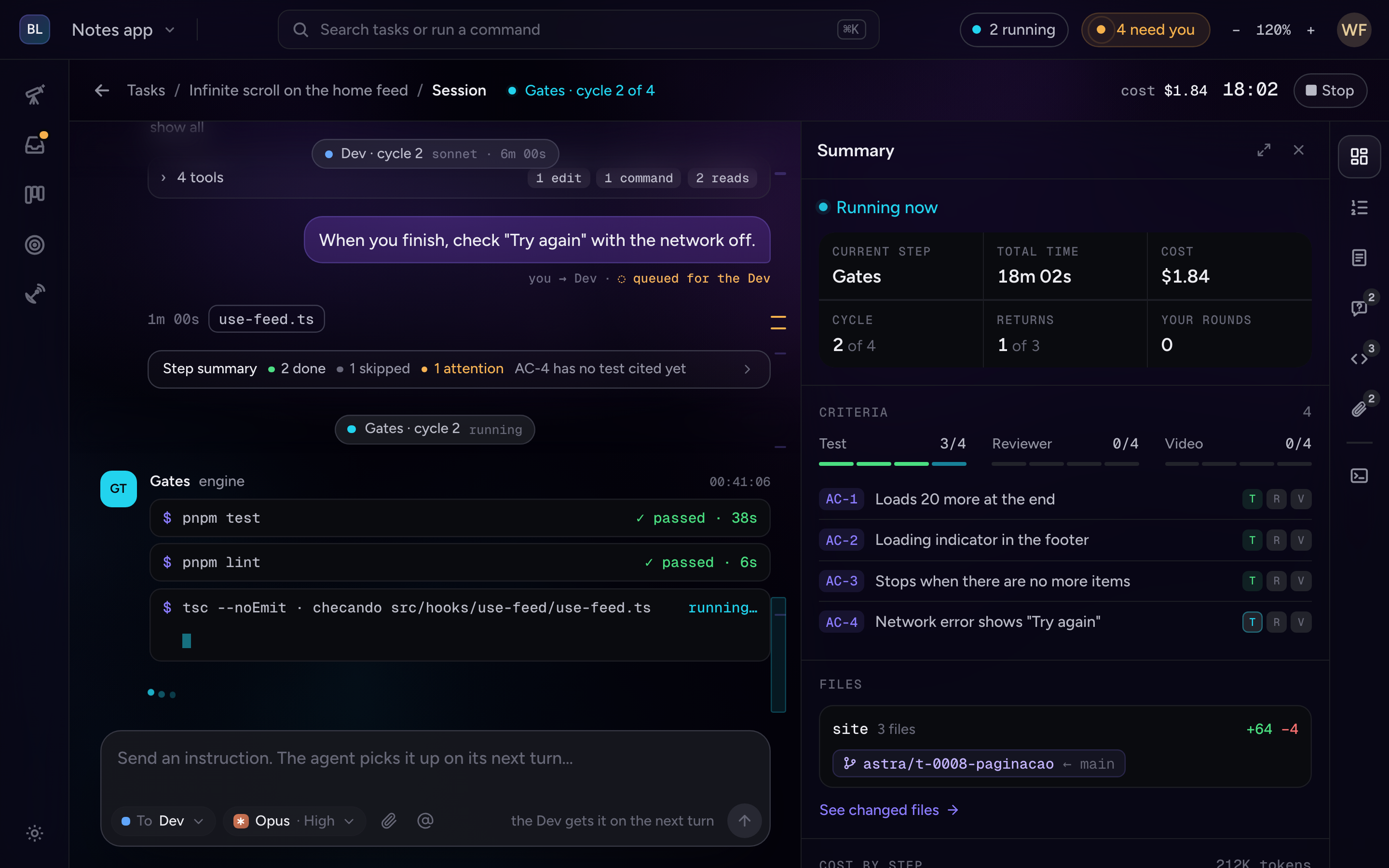
Add --follow to approve, decide, retry or validate to stream gate_started and gate_result events. events streams them for the whole workspace.
All options
Section titled “All options”Gate keys
Section titled “Gate keys”| Key | Required | Default | Meaning |
|---|---|---|---|
name |
yes | Label shown in events, the log file name and the app. | |
command |
yes | Run by the workspace shell in the repo’s worktree. | |
timeout_seconds |
no | 900 |
The gate fails when it runs longer. |
The keys are checked with the rest of the config, so a typo like timeout: 60 fails to load instead of being ignored.
Result fields
Section titled “Result fields”| Field | Meaning |
|---|---|
repo, name, command |
Which gate, and the command after the template values were filled in. |
status |
passed, failed or skipped. |
exitCode |
null when skipped. |
timedOut |
true when the time limit stopped it. |
durationMs |
Run time. |
outputTail |
The last lines of output. |
culprits |
On failure: file paths found in the output, such as FAIL src/notes.test.ts or src/notes.ts:12, relative to the repo. |
culpritsOutsideDiff |
The culprits the task did not change. A failure there often means the base branch was already broken. |
Where the files go
Section titled “Where the files go”- Output of each gate:
runs/<task>/cycle-N/gates/<repo>-<gate>.log - All results of a cycle:
runs/<task>/cycle-N/gates.json
Good to know
Section titled “Good to know”Next steps
Section titled “Next steps”- config.yaml: where gates are declared
- Flows:
checksteps andon_fail - Events:
gate_startedandgate_result