
Send instructions mid-run
Add a note, a file or a stronger model to a running task from the session composer, and the agent picks it up on its next turn.
While a task runs you often notice something the agent should know: the search input needs a debounce, the reviewer skipped a file that matters. You do not have to stop the task or wait for it to fail. You send the agent a short note, called an instruction, and it reads that note the next time it starts working.
Send your first instruction
Section titled “Send your first instruction”You send an instruction to one step of the task: the one that should read it. Only the ideator, the developer and the reviewer take instructions, or more precisely, steps of type ideate, develop or review in your Flow.
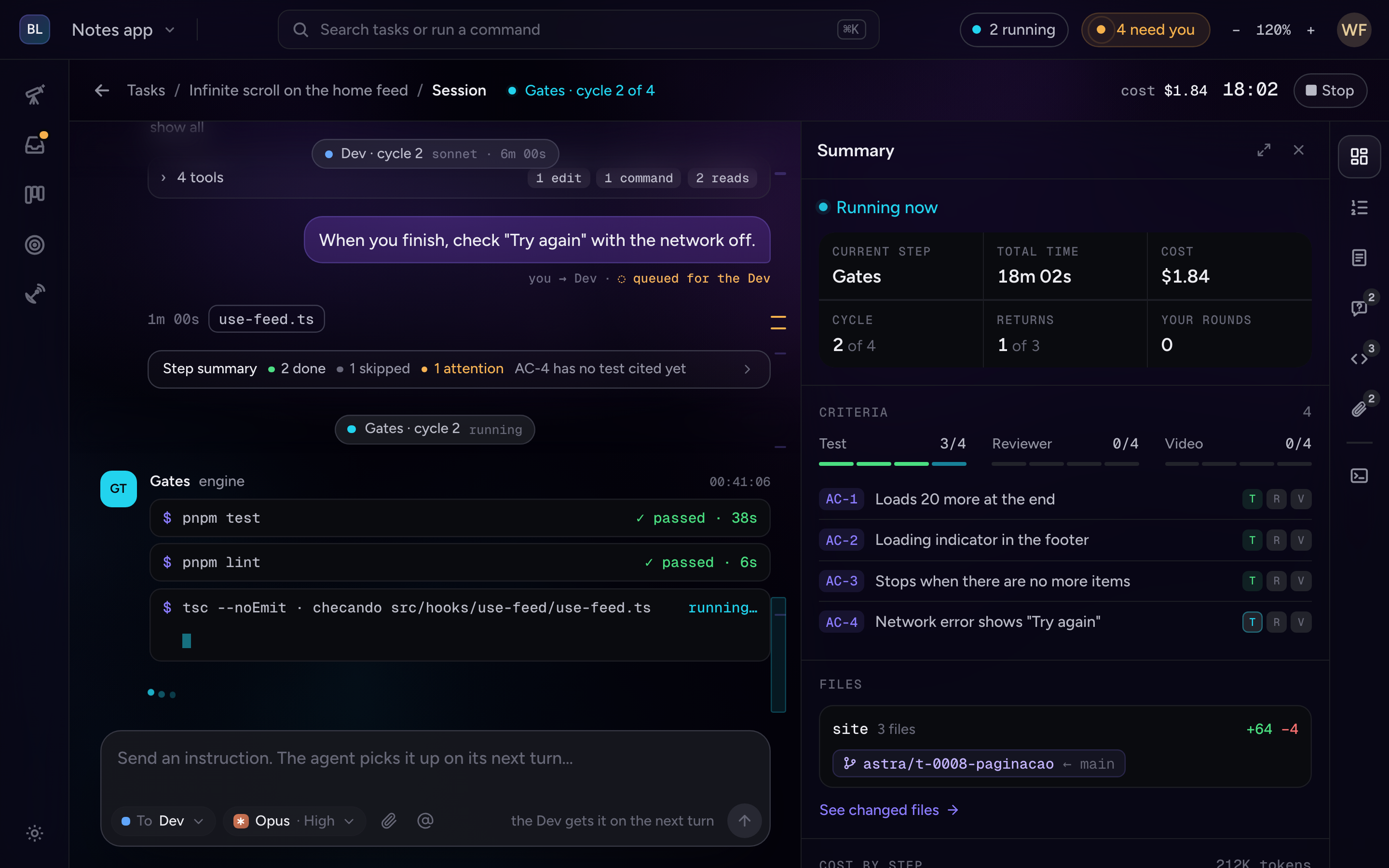
Open the task’s session: click Session on the task’s overview. The box at the bottom is the composer, with the hint “Send an instruction. The agent picks it up on its next turn…”.
- Pick the step that should read it with To, for example Dev.
- Type the instruction, such as “Debounce the search input by 200 ms”.
- Click send.
The instruction shows up in the session as your message, marked “queued for the Dev”. Next to the send button, the composer tells you when it will be read, for example “the Dev gets it on the next turn”. When the step picks it up, the mark changes to “applied”.
instruct takes the task, the step that should read the note, and the text:
astranize instruct t-0001 --workspace notes --to developer --text "Debounce the search input by 200 ms"{"type":"instruction_added","taskId":"t-0001","instruction":{"id":"I-1","text":"Debounce the search input by 200 ms","target":"developer","attachments":[],"createdAt":"2026-11-20T03:37:27.051Z","status":"pending"},"at":"2026-11-20T03:37:27.051Z"}The instruction got the id I-1 and the status pending. The app sees it right away, because the same event is added to the task’s events.jsonl.
--to takes a step id. In the default Flow those are ideator, developer and reviewer. Anything else is refused:
{"type":"error","message":"Invalid instruction target \"gates\""}Nothing was interrupted. The instruction waits in the task’s run folder until the step starts its next turn.
When the agent reads it
Section titled “When the agent reads it”Each agent turn is a separate claude -p process. It reads its whole prompt when it starts and then works alone, so there is no way to type into it mid-turn. That is why instructions wait.
The next turn comes when the step runs again: the first time the task reaches that step, after the gates or the reviewer send the task back, or after you answer one of the agent’s questions. At that moment Astranize takes every pending instruction for the step, adds them to its prompt and marks them applied.
Attach a file and swap the model
Section titled “Attach a file and swap the model”You can give the agent a file to look at, such as a mockup or a log. And when a round needs more thinking than the Flow gives it, you can change the model and effort for that one round.
In the composer, Attach adds files to the message, and the @ button (Cite a criterion or question) inserts a chip such as @AC-1, so the agent knows exactly what you mean.
The model pill next to To (“Model for this message”) opens the model and Effort picker. When you pick another one, the composer shows “Only this message uses opus · high”. Back to default removes the swap.
Pass --attach with an absolute path; repeat it for more files. --model and --effort change the model for that one round.
-
Send an instruction with an attachment and a model swap. These commands ran with fake agents (
--fake), on a task waiting for approval.Terminal window astranize instruct t-0001 --workspace notes --to developer \--text "Debounce the search input by 200 ms" \--model opus --effort high --attach ~/Desktop/mockup-notes.txt{"type":"instruction_added","taskId":"t-0001","instruction":{"id":"I-1","text":"Debounce the search input by 200 ms","target":"developer","attachments":["attachments/I-1-mockup-notes.txt"],"createdAt":"2026-11-20T02:38:11.215Z","status":"pending","model":"opus","effort":"high"},"at":"2026-11-20T02:38:11.215Z"}The file is copied to
runs/t-0001/attachments/I-1-mockup-notes.txt, so you can change or delete the original. -
Approve the spec. When the developer step starts, it takes the instruction:
Terminal window astranize approve t-0001 --workspace notes --repos web --fake ./run.mjs --follow{"type":"instruction_applied","taskId":"t-0001","instructionId":"I-1","step":"developer","cycle":1,"at":"2026-11-20T02:38:24.234Z"}{"type":"step_agent","taskId":"t-0001","step":"developer","cycle":1,"note":{"executor":"claude","model":"opus","effort":"high","downgraded":false,"overridden":true,"switchedFrom":null,"permissionMode":"ask"},"at":"2026-11-20T02:38:24.257Z"}The Flow asks for
sonneton the developer, but this round ran onopuswith high effort, andoverriddenistrue. The reviewer got no swap and ran on its own model. -
The developer’s prompt gained a section with the instruction and the path of its attachment. The attachments folder is also added to the directories the agent may read.
## Instruções de Wendel recebidas durante a execução- I-1 (2026-11-20 02:38): Debounce the search input by 200 msAnexos: ~/.astranize/workspaces/notes/runs/t-0001/attachments/I-1-mockup-notes.txtPrompt sections are written in Portuguese today. The agent still answers in the language set with
set-language.
How long the swap lasts
Section titled “How long the swap lasts”The swap covers the next round of the target step and nothing more. It holds while that round pauses (for a question to you, a stop, or a wait for usage limits) and is cleared when the round ends. The round after that uses the Flow’s model again.
When several instructions with a swap are taken in the same round, the newest one wins. A swap also wins over the step’s downgrade, and it applies only to the Claude executor.
Ask the ideator for a change
Section titled “Ask the ideator for a change”The ideator works a little differently. When the task is waiting for your approval, or is blocked, an instruction to the ideate step does not wait for a next turn. It becomes an adjustment request right away: the ideator runs again with your text and any attachment paths, and the instruction is recorded as applied via: "adjustment".
A model swap sent with it applies to that ideation round.
In the app, the composer tells you which case you are in: with To set to the ideator, the hint reads “becomes a change request to the Ideator” or “the Ideator reads it on the next ideation”.
Good to know
Section titled “Good to know”The instruction log
Section titled “The instruction log”Every instruction is kept in runs/<task>/instructions.jsonl, with one line when it is added and one when it is applied:
{"kind":"added","instruction":{"id":"I-1","text":"Debounce the search input by 200 ms","target":"developer","attachments":["attachments/I-1-mockup-notes.txt"],"createdAt":"2026-11-20T02:38:11.215Z","status":"pending","model":"opus","effort":"high"}}{"kind":"applied","id":"I-1","step":"developer","cycle":1,"at":"2026-11-20T02:38:24.234Z"}It runs on your machine
Section titled “It runs on your machine”instruct runs locally, not through the daemon, and prints one instruction_added event. Because --attach names a file on your machine, it is refused when you send the command to another machine with --machine. See Connect a machine.
All flags
Section titled “All flags”astranize instruct <task> --workspace <ws> --to <step> --text "<text>" \ [--attach <absolute path>]... [--model <model> --effort <effort>]| Flag | Required | Meaning |
|---|---|---|
--to |
yes | Step id of an ideate, develop or review step in the task’s Flow. |
--text |
yes | The instruction. Leading and trailing space is trimmed; empty text is refused. |
--attach |
no | An absolute path to a regular file, up to 25 MB. Repeat the flag for more files. Symbolic links are refused. |
--model |
no | fable, opus, sonnet or haiku. Only with --effort. |
--effort |
no | low, medium, high, xhigh or max. Only with --model. |
Errors
Section titled “Errors”| Message | Cause |
|---|---|
Missing required option --to or --text |
Both are required. |
Invalid instruction target "gates" |
Only ideate, develop and review steps take instructions. |
Model and effort must be sent together |
Send both or neither. |
Unknown model "gpt" / Unknown effort "huge" |
See the lists above. |
Attachment must be an absolute path: mockup-notes.txt |
Use a full path. |
Attachment is larger than 25 MB: ... |
Send a smaller file. |
Task t-0001 is done |
A finished task takes no more instructions. |
Next steps
Section titled “Next steps”- Build a Flow to set each step’s usual model.
- Economy and limits for how models and downgrades are chosen.
- CLI reference for
instructand the other task commands.